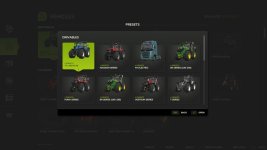

Add a touch of convenience to your game by saving your favorite vehicle configurations. Instead of manually configuring complex setups with colors, wheel brands, and engine options every time you buy a vehicle, you can now save them as presets for quick and easy access.
Features:
Save up to 10 customized presets per vehicle directly from the shop configuration screen.
Supported configurations include base variants, multiple custom colors, and material changes.
Instantly apply, overwrite, or delete your saved configurations.
Browse all accumulated presets organized by vehicle in the global browser.
Hotkeys:
Press ‘V’ to open the “All Presets” browser directly from the store pages.
Press ‘V’ to open the “Presets” dialog in the shop configuration screen.
V1.0.2.1
Fixed presets not being recognized when the mod folder name contains ‘FS25_’ in its path.
Improved preset storage with relative paths to survive mod folder changes (1.0.2.0).
Removed automatic deletion of presets for uninstalled mods due to the changes above (1.0.2.0).
Added ability to change the keybind for opening preset dialogs (1.0.1.0).
- Authors / Credits
- aaw3k
- Download modification
- https://zippymods.com/p9656ivt66k0/FS25_vehiclePresets.zip.html

 Farming Simulator 25 Mods
 FS25 Maps
 FS25 Tractors
 FS25 Harvesters
 FS25 Trucks
 FS25 Trailers
 FS25 Vehicles
 FS25 Cars
 FS25 Buildings
 FS25 Implements
 FS25 Forklifts & Excavators
 FS25 Forestry
 FS25 Decorations
 FS25 Placeable objects
 FS25 Prefab
 FS25 Packs
 FS25 Weights
 FS25 Misc
 FS25 Textures
 FS25 Savegames
 FS25 Scripts
 FS25 Autodrive