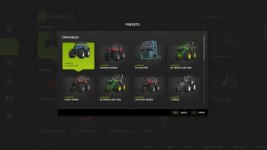

Add a touch of convenience to your game by saving your favorite vehicle configurations. Instead of manually configuring complex setups with colors, wheel brands, and engine options every time you buy a vehicle, you can now save them as presets for quick and easy access.
Features:
– Save up to 10 customized presets per vehicle directly from the shop configuration screen.
– Supported configurations include base variants, multiple custom colors, and material changes.
– Instantly apply, overwrite, or delete your saved configurations.
– Browse all accumulated presets organized by vehicle in the global browser.
– Automatically removes presets for uninstalled mod vehicles.
Hotkeys:
– Press ‘X’ to open the “All Presets” browser directly from the store pages.
– Press ‘X’ to open the “Presets” dialog in the shop configuration screen.
For more info, bug reports, or to contribute, check out GitHub (modnext/vehiclePresets).
- Authors / Credits
- aaw3k
- Download modification
- https://zippymods.com/5c6lm5164wnk/FS25_vehiclePresets.zip.html

 Farming Simulator 25 Mods
 FS25 Maps
 FS25 Tractors
 FS25 Harvesters
 FS25 Trucks
 FS25 Trailers
 FS25 Vehicles
 FS25 Cars
 FS25 Buildings
 FS25 Implements
 FS25 Forklifts & Excavators
 FS25 Forestry
 FS25 Decorations
 FS25 Placeable objects
 FS25 Prefab
 FS25 Packs
 FS25 Weights
 FS25 Misc
 FS25 Textures
 FS25 Savegames
 FS25 Scripts
 FS25 Autodrive