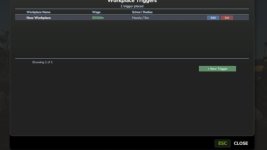
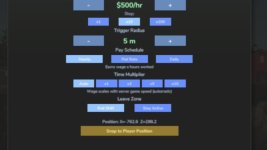
Turn any location on any map into a legitimate workplace. Open the Workplace Manager, add a trigger, give it a name and a wage, place it anywhere on the map — then walk in and clock in. Perfect for roleplayers who want their farmer to have a side job, or anyone looking to supplement farm income with off-farm work.
FEATURES
– Placeable trigger zones — invisible zones you drop anywhere, indoors or outdoors
– Three pay schedules per trigger: Hourly, Flat Rate per shift, or Daily rate
– Shift tracking HUD — live workplace name, time elapsed, and current earnings; drag and resize it anywhere on screen
– Workplace Manager (F4) — view, edit, and delete all your triggers from one screen
– Shift history log — last 50 completed shifts saved with name, duration, payout, and in-game day
– Persistent saves — all triggers, names, wages, and schedules survive reloads; each savegame has its own set
– Multiplayer — each player tracks their own shifts; earnings go to the shared farm account
– Optional FS25_NPCFavor integration — completing shifts builds NPC relationships
– Optional FS25_WorkerCosts integration — off-farm income tracked alongside AI worker wages
HOW TO USE
1. Press F4 to open the Workplace Manager and click Add
2. Name the workplace, set a wage, choose a pay schedule, then confirm
3. Place the trigger at any location on the map
4. Walk into the zone and press E to start your shift
5. Press E again to end your shift and collect your wages
CONTROLS
E – Start / end shift (when inside a trigger zone)
F4 – Open / close Workplace Manager <- can be rebind
Left Shift – Toggle HUD edit mode (drag and resize the panel)
SETTINGS
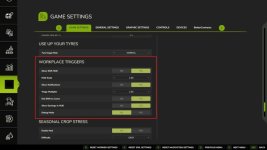
Found under ESC > Settings > General Settings > Workplace Triggers:
– Show Shift HUD
– HUD Scale
– Show Notifications
– Wage Multiplier (global modifier on top of per-trigger wages)
– End Shift on Leave (auto-end shift when leaving the zone)
– Show Earnings in HUD
– Debug Mode
Languages: EN / DE / FR / IT / NL / PL
Multiplayer: Yes
V1.1.1.0
Previously, the server used a single shared slot to track the active shift. When a second player clocked in, it would silently end the first player’s shift early paying them out immediately and leaving their client stuck showing a running shift they could no longer stop.
What was fixed:
– The server now tracks shifts per farm using an independent slot per farmId. Multiple farms can have concurrent active shifts without interfering with each other.
– A duplicate clock-in guard prevents the same farm from accidentally starting a second shift if the event fires twice.
– Deleting a trigger now correctly cleans up any active per-farm shifts using that trigger, not just the single-slot state.
– SP and listen-server host behaviour is unchanged the single-slot fields used for zone checks and HUD updates are preserved and still work as before.
This fix only matters in multiplayer / dedicated server sessions with two or more farms clocked in at the same time. Singleplayer and single-farm multiplayer sessions were unaffected by the original bug.
- Authors / Credits
- tisonK
- Download modification
- https://zippymods.com/o2bens8jj7o5/FS25_WorkplaceTriggers.zip.html

 Farming Simulator 25 Mods
 FS25 Maps
 FS25 Tractors
 FS25 Harvesters
 FS25 Trucks
 FS25 Trailers
 FS25 Vehicles
 FS25 Cars
 FS25 Buildings
 FS25 Implements
 FS25 Forklifts & Excavators
 FS25 Forestry
 FS25 Decorations
 FS25 Placeable objects
 FS25 Prefab
 FS25 Packs
 FS25 Weights
 FS25 Misc
 FS25 Textures
 FS25 Savegames
 FS25 Scripts
 FS25 Autodrive