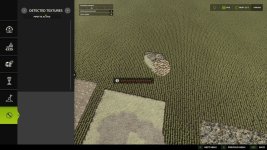
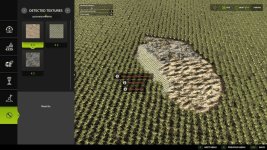
The Texture Pipette adds a practical pipette function for ground textures to the construction menu.
It allows previously used paint textures to be picked directly from the map and found again more quickly in the construction menu. The mod searches for matching textures, prioritizes suitable results and, when needed, shows several possible candidates.
How to use:
1. Open the “Pipette” tab in the construction menu.
2. Press the “Activate pipette” button.
3. Click an already painted ground texture.
4. Confirm the found or desired texture in the construction menu.
5. Paint as usual.
After painting, cancel the action with ESC to avoid unintended further paint strokes. If needed, activate the pipette again and confirm the desired texture once more.
The mod also considers available ground textures of the current map so that suitable textures are available as completely as possible.
The Texture Pipette is intended as an expandable construction-menu tool. Additional useful functions for finding and taking over suitable content more quickly will be added in later versions.
- Authors / Credits
- Nalathan
- Download modification
- https://zippymods.com/3qgjlr9wo130/FS25_TexturePipette.zip.html

 Farming Simulator 25 Mods
 FS25 Maps
 FS25 Tractors
 FS25 Harvesters
 FS25 Trucks
 FS25 Trailers
 FS25 Vehicles
 FS25 Cars
 FS25 Buildings
 FS25 Implements
 FS25 Forklifts & Excavators
 FS25 Forestry
 FS25 Decorations
 FS25 Placeable objects
 FS25 Prefab
 FS25 Packs
 FS25 Weights
 FS25 Misc
 FS25 Textures
 FS25 Savegames
 FS25 Scripts
 FS25 Autodrive