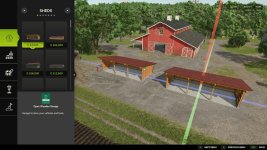
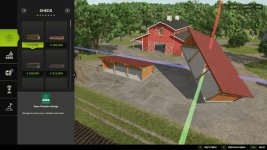

This mod allows you to reposition placed objects. It supports movement along all three axes (X, Y, Z) as well as rotation around all three axes.
Usage:
– Open the construction menu (default: Shift+P)
– Select the placed object
– Select the Move option
– Left-click on one of the 3 axes and move the mouse => Move the object along the axis
– Right-click on one of the 3 axes and move the mouse => Change the object’s rotation around the axis
– Confirm the change by clicking on the placed object again or by pressing the Escape key; a final confirmation prompt will appear
– While editing, you can press Escape to discard or undo the change
Settings for the mod can be found under General Settings in the menu:
– Free Movement: When enabled, moving objects incurs no cost.
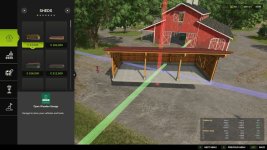
– Show Coordinate Overlay: Displays the starting and current coordinates (position and rotation) as an overlay when moving objects
ATTENTION! This mod is a complete remake of the mod “Rearrange Placeables” by Helfer B (myself).
The new mod is not compatible with the old mod but replaces it.
All functions have been revised and optimized to provide a better user experience.
If you are using the mod “FS25_RearrangePlaceables.zip”, you must delete it first in order to use the new perfect version “Move Placeables Advanced”.
Changelog 2.0.0.0:
– Completely new code
– Various minor bug fixes
– Various logic optimizations
– Pre-placed map objects can now be repositioned without errors
– Added setting for repositioning costs
– Added overlay showing before/after/diff for the object’s alignment and rotation (can be disabled in settings)
- Authors / Credits
- Helfer B.
- Download modification
- https://zippymods.com/j529dk1ynbv5/FS25_MovePlaceablesAdvanced.zip.html


 Farming Simulator 25 Mods
 FS25 Maps
 FS25 Tractors
 FS25 Harvesters
 FS25 Trucks
 FS25 Trailers
 FS25 Vehicles
 FS25 Cars
 FS25 Buildings
 FS25 Implements
 FS25 Forklifts & Excavators
 FS25 Forestry
 FS25 Decorations
 FS25 Placeable objects
 FS25 Prefab
 FS25 Packs
 FS25 Weights
 FS25 Misc
 FS25 Textures
 FS25 Savegames
 FS25 Scripts
 FS25 Autodrive