FS25 Additional Game Settings V1.0.0.5

  • Thread Author
additional-game-settings-v1.0.0.5-1.jpg


additional-game-settings-v1.0.0.5-4.jpgadditional-game-settings-v1.0.0.5-3.jpgadditional-game-settings-v1.0.0.5-2.jpgadditional-game-settings-v1.0.0.5-1.jpg

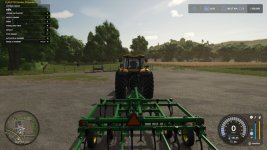
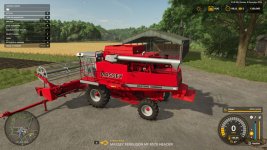
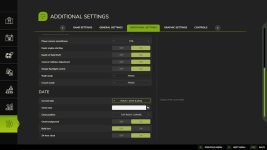
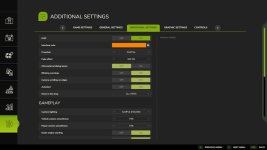
This mod adds a new settings tab to the pause menu.

Available functions:
– Enable/disable the interface,
– Change the interface color (custom colors can be added to the file “…/modSettings/FS25_additionalGameSettings/uiColors.xml”),
– Enable/disable the crosshair,
– Display a transition effect when switching cameras,
– Enable/disable unnecessary informational windows,
– Enable/disable blinking notifications,
– Enable/disable mouse camera movement in object placement mode,
– Enable/disable automatic game save start,
– Filter objects in the shop (all/base/mods/DLC),
– Toggle lighting from other maps (custom lighting can be added to the folder “…/modSettings/FS25_additionalGameSettings/lighting”),
– Smooth camera movements,
– Start the vehicle engine by pressing the acceleration key,
– Enable/disable depth of field (DoF),
– Enable/disable camera collision,
– Display the current date (customizable format/position/background/color/font boldness),
– Added “Quit to desktop” button.

V1.0.0.5
– Added tooltips for disabled interface options,
– Improved compatibility with some mods.
 
Authors / Credits
Rockstar
Download modification
https://zippymods.com/2h906vd279hd/FS25_additionalGameSettings.zip.html
Thank you for sharing the details of the Additional Game Settings V1.0.0.5 mod for FS25. This mod seems to offer a wide range of customizable options that can enhance the gameplay experience for players. Here is a breakdown of the available functions and improvements in version 1.0.0.5:

1. Enable/disable the interface: Allows players to toggle the game interface on or off for a more immersive experience.
2. Change interface color: Customizable interface colors can be added to the designated file for a personalized look.
3. Enable/disable the crosshair: Players can choose whether to have a crosshair on their screen.
4. Transition effect for camera switching: Adds visual effects when changing camera views for a smoother transition.
5. Enable/disable unnecessary informational windows: Customize the display of in-game information windows based on preference.
6. Enable/disable blinking notifications: Choose whether to have notifications blink for attention.
7. Mouse camera movement in object placement mode: Toggle mouse-controlled camera movement while placing objects.
8. Automatic game save start: Decide if the game should automatically save progress at set intervals.
9. Filter objects in the shop: Categorize shop items by type for easier browsing.
10. Toggle lighting from other maps: Access custom lighting effects from a specific folder for varied visual experiences.
11. Smooth camera movements: Enhance camera transitions with smoother movements.
12. Start vehicle engine with the acceleration key: Simplify vehicle operation with a key press.
13. Enable/disable depth of field: Adjust depth of field effects in the game.
14. Enable/disable camera collision: Choose whether the camera collides with objects in the environment.
15. Display current date: Customize the format, position, background, color, and font boldness of the date display.
16. "Quit to desktop" button: Added option to quit the game directly to the desktop.

In version 1.0.0.5:
- Tooltips for disabled interface options: Provides additional information for disabled interface options.
- Improved compatibility with some mods: Enhancements to ensure smoother integration with other mods.

These features offer players more control over their gaming experience, allowing them to tailor various settings to suit their preferences and play style. It's great to see ongoing updates and improvements to enhance compatibility and functionality.
 
FS25 Sidebar Menu (PNG Icons)

FS25Mods.com - Download Farming Simulator 25 Mods for FREE

Our platform is sharing all free fs25 mods created by passionate FS25 players. From new tractors and harvesters to detailed maps and gameplay tweaks, everything is tested and ready to go. Finding and installing mods is super easy. Just browse by category, pick what you like, and download fast for free. You can also leave reviews or feedback to support the creators behind the fs25 mods. Whether you’re new to the game or you’ve been modding for years, FS25Mods.com is a great place to discover latest game mods for FS25 game.

Back
Top