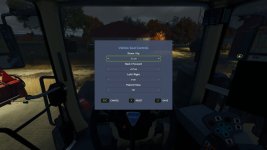
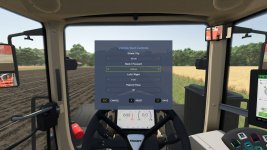
Adjust the indoor (cab) camera position and field of view of your vehicles.
While seated in a vehicle, press Numpad – (rebindable in Settings > Controls) to open the Vehicle Seat Controls window.
Use the arrow selectors to set:
– Up / Down
– Forward / Back
– Left / Right
– Field of View (zoom)
Changes preview live on the cab. Press Save to keep them, Reset to recenter, or Cancel to discard.
Want to look around while you adjust? Click and hold the left mouse button anywhere outside the window and drag to freely glance around the cab – the menu stays open the whole time, so you can line up the perfect view before saving.
Settings are saved per player and per vehicle and persist across leaving/rejoining and server restarts.
V1.0.0.1
Improved compatibility with other camera mods by using a safer camera update chain.
Added compatibility fixes for tractors where the menu input did not register correctly.
Increased the available camera position adjustment range.
- Authors / Credits
- Magzan
- Download modification
- https://zippymods.com/wmpv306dqdpe/FS25_VehicleSeatControls.zip.html


 Farming Simulator 25 Mods
 FS25 Maps
 FS25 Tractors
 FS25 Harvesters
 FS25 Trucks
 FS25 Trailers
 FS25 Vehicles
 FS25 Cars
 FS25 Buildings
 FS25 Implements
 FS25 Forklifts & Excavators
 FS25 Forestry
 FS25 Decorations
 FS25 Placeable objects
 FS25 Prefab
 FS25 Packs
 FS25 Weights
 FS25 Misc
 FS25 Textures
 FS25 Savegames
 FS25 Scripts
 FS25 Autodrive