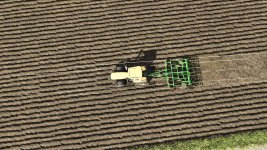
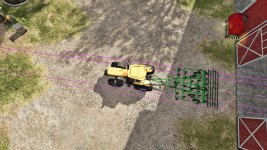
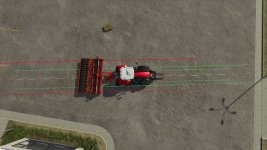
Tool Work Lines adds visual guidelines to help you see exactly where your tools and implements will work before you start the job.
Hold the show-lines key and the mod displays left/right work-width indicators on the ground, plus a dotted center guide line. This helps with lining up passes more accurately when mowing, cultivating, plowing, seeding, spraying, using bale equipment, and working with other tools.
Multiplayer- Not tested
Features
Shows the tool work-width guide lines while holding the key
Supports many field tools, including:
mowers
cultivators
plows
seeders
sprayers
windrowers
bale wrappers/bale pickup equipment
trailers and fallback vehicle outlines, where possible
Separate line sets for multiple attached tools, such as front mower + rear mower combinations
Dotted center guide line for easier alignment
Predictive curved guide lines while turning
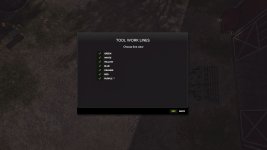
Color selection menu for guidelines
Saves your selected line color
Controls
Hold Left Alt – Show tool work lines
Left Alt + Z – Open line color menu
Left Alt + X – Toggles the lines on and off option
Controls can also be changed in the game’s control settings.
Planned Upgrades
Future updates may include:
Improved support for more modded tools
Better detection for tools that do not use standard work-area nodes
More accurate bale pickup and wrapper guide zones
Additional line styles and visibility options
Optional longer/shorter prediction distance
More advanced turning prediction
Possible per-tool color options
Further cleanup for unusual tool combinations
Beta Notice
This is a beta release. The main work-line system is working well, but some tools may still use fallback detection if they do not provide standard work-area data. Please report any tools that show incorrect width, position, or direction so support can be improved in future updates.
Changelog
v0.1.0.21 Beta
Added work-width guide lines for tools and implements
Added dotted center guide line
Added support for front/rear tool combinations
Added improved bale pickup and wrapper detection
Added curved prediction while turning
Added Alt + Z color dialog
Added selectable line colors
Removed right-side notification spam
Added movement/camera lock while the color menu is open
Prepared beta release package
BETA 3
V_0.1.0.3
Changed to beta, did not mean to have it be a release version- we are still working through errors and improving. Your feedback is much appreciated. Thanks!
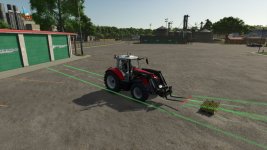
Added projection-style guidelines for front loader attachments.
Front loader tools now draw projected lines from the attachment instead of full-body fallback lines.
Added support for loader tools such as:
– buckets, pallet forks, bale forks, bale spikes, grapples, similar front loader attachments
– Attachment projection lines now follow the attachment’s current pointing angle/height instead of snapping flat to the ground.
– Added a red cross/edge line at the front attachment edge.
Added separate color settings for:
– Rear/default tool lines, front attachment projection lines
– Updated the Alt + Z color dialog to include both rear/default and front attachment color options.
– Improved front/rear weight detection so weights should be skipped before fallback lines are drawn.
Fixed:
– Key binding issues.
- Authors / Credits
- plutogaming91
- Download modification
- https://zippymods.com/j8v99q0w0gv5/FS25_ToolWorkLines_v0_1_0_3.zip.html

 Farming Simulator 25 Mods
 FS25 Maps
 FS25 Tractors
 FS25 Harvesters
 FS25 Trucks
 FS25 Trailers
 FS25 Vehicles
 FS25 Cars
 FS25 Buildings
 FS25 Implements
 FS25 Forklifts & Excavators
 FS25 Forestry
 FS25 Decorations
 FS25 Placeable objects
 FS25 Prefab
 FS25 Packs
 FS25 Weights
 FS25 Misc
 FS25 Textures
 FS25 Savegames
 FS25 Scripts
 FS25 Autodrive