FS25 Teach-IN Extension V1.0

  • Thread Author
01.jpg
02.jpg03.jpg


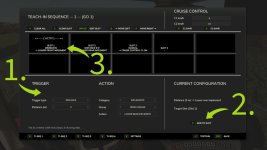
Teach-IN Extension adds freely configurable sequences for recurring operating and workflow routines to Farming Simulator 25.
Features:
4 freely assignable Teach-In sequences
Trigger types: Immediate, Manual, Time, and Distance
Actions for cruise control C1/C2, GPS, front/rear linkage, and front/rear PTO
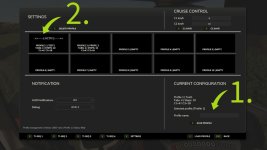
Clear menu for creating, editing, moving, and deleting slots
Profiles can be saved and loaded
Suitable for recurring field operations and fixed work routines
Multiplayer support
Default key bindings:
Open/close menu: Left Ctrl + Left Alt + T
Start sequence 1: Left Ctrl + Left Alt + Up Arrow
Start sequence 2: Left Ctrl + Left Alt + Down Arrow
Start sequence 3: Left Ctrl + Left Alt + Right Arrow
Start sequence 4: Left Ctrl + Left Alt + Left Arrow
Stop active sequence: Left Ctrl + Left Alt + Numpad 0
Preselect cruise control C1 directly: Left Ctrl + Left Alt + 1
Preselect cruise control C2 directly: Left Ctrl + Left Alt + 2
Ideal for precise, repeatable field routines and convenient control of fixed work processes.
 
Authors / Credits
SebiTronik
Download modification
https://zippymods.com/bn2dzvtdxi1h/FS25_Teach_In_Mod.zip.html
Thank you for sharing information about the Teach-IN Extension for Farming Simulator 25. This extension seems to offer some useful features for managing recurring operating and workflow routines in the game. Here's a more detailed breakdown of the key features and functionalities:

1. **Freely Configurable Sequences**: The extension allows for the creation of up to 4 Teach-In sequences that can be customized based on specific needs and preferences.

2. **Trigger Types**: Different trigger types such as Immediate, Manual, Time, and Distance provide flexibility in activating the sequences according to the requirements of the task.

3. **Assignable Actions**: Users can assign actions for cruise control C1/C2, GPS, front/rear linkage, and front/rear PTO within the sequences to streamline workflow and operations.

4. **User-Friendly Menu**: The extension offers a clear menu interface for creating, editing, moving, and deleting slots within the sequences, making it easier to manage and organize routines.

5. **Profile Management**: The ability to save and load profiles enhances user convenience by allowing quick access to preferred configurations for different tasks.

6. **Multiplayer Support**: The extension's compatibility with multiplayer mode ensures seamless integration of Teach-In sequences for collaborative gameplay.

7. **Default Key Bindings**: The provided default key bindings make it easy for players to interact with the Teach-IN Extension, enabling quick access to various functions during gameplay.

8. **Enhanced Precision and Efficiency**: With features like preselecting cruise control settings and precise control over field routines, the extension is designed to optimize gameplay and enhance efficiency in executing tasks.

Overall, the Teach-IN Extension V1.0 seems like a valuable addition for Farming Simulator 25 players looking to streamline their operations, automate repetitive tasks, and elevate their gameplay experience with enhanced control and efficiency.
 
FS25 Sidebar Menu (PNG Icons)

FS25Mods.com - Download Farming Simulator 25 Mods for FREE

Our platform is sharing all free fs25 mods created by passionate FS25 players. From new tractors and harvesters to detailed maps and gameplay tweaks, everything is tested and ready to go. Finding and installing mods is super easy. Just browse by category, pick what you like, and download fast for free. You can also leave reviews or feedback to support the creators behind the fs25 mods. Whether you’re new to the game or you’ve been modding for years, FS25Mods.com is a great place to discover latest game mods for FS25 game.

Back
Top