


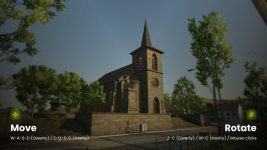
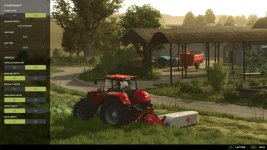
Enhance your in-game screenshots with the Screenshot Mode!
This mod gives you full control to create stunning screenshots by freely controlling the camera, modifying the environment (time, weather, season), configuring the controlled vehicle, and more.
Feature overview:
– Freely move and rotate the camera
– Adjust Field of View (FOV)
– Select season period
– Set weather (rain, hail, cloudy, sunny)
– Choose time of day
– Pause or unpause the game
– Configure vehicle lights and character visibility
– Multiplayer compatible!
Inspired by Euro Truck Simulator 2 Photo Mode, the controls are intuitive and easy to use.
Controls:
– Open Screenshot Mode: Alt + j
– Move: W-A-S-D (Qwerty, Qwertz) / Z-Q-S-D (Azerty)
– Fly: Q-E (Qwerty, Qwertz) / A-E (Azerty)
– Rotate: Z-C (Qwerty) / W-C (Azerty) / Y-C (Qwertz) / Left mouse click
– Adjust FOV: Mouse Wheel
– Reset FOV: Mouse wheel click
– Change camera speed / FOV zoom speed: Left Ctrl / Shift
V1.0.0.1
– Fixed hail appearing when opening the Esc menu or Shop menu
- Authors / Credits
- Monsieur Bab
- Download modification
- https://zippymods.com/8ijr2spew82c/FS25_ScreenshotMode.zip.html

 Farming Simulator 25 Mods
 FS25 Maps
 FS25 Tractors
 FS25 Harvesters
 FS25 Trucks
 FS25 Trailers
 FS25 Vehicles
 FS25 Cars
 FS25 Buildings
 FS25 Implements
 FS25 Forklifts & Excavators
 FS25 Forestry
 FS25 Decorations
 FS25 Placeable objects
 FS25 Prefab
 FS25 Packs
 FS25 Weights
 FS25 Misc
 FS25 Textures
 FS25 Savegames
 FS25 Scripts
 FS25 Autodrive