What it does
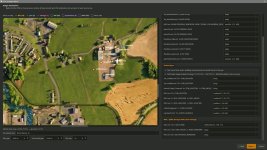
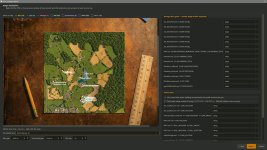
FS25 has no built-in way to move a farm between maps. This tool reads your existing savegame, lets you point at a fresh save on the new map, and rewrites the new save with your farm — placed exactly where you click on the PDA-style overview. This is not Dummy proof, some common sense is needed.
This is a EXE file, on first launch you will get a windows prompt from windows defender, as this is read and writing to folders, Click on More Info and run anyway
Migrates:
All vehicles & equipment owned by your farm (farmId=1)
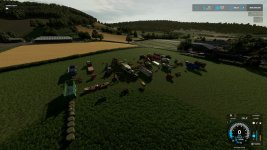
Snapped to the ground via the target map’s heightmap
Rotated to face one direction (N / E / S / W)
Arranged in a configurable grid (default 10m × 10m)
Attached implements automatically detached so each unit lands individually
Bales, pallets and other items sitting in the world (items.xml)
Bales & pallets in auto-storage sheds (<objectStorage>)
Animal herds (cows, sheep, pigs, chickens, horses, etc.) merged into target pens you pick
Pen-internal storage — food (hay/grass/silage/TMR/grain/forage), bedding (straw), water, and produced outputs (slurry / manure / milk)
Loose grain / diesel / fertiliser / seeds / lime stored in silos — both <fillUnit><unit> and <silo><storage><node> shapes
Farm money and loans
Same-map version upgrade mode
When the source and target savegames reference the same mapId (e.g. you were running v1.0 of a map mod, the author released v1.1 with savegame-breaking changes, and you’ve started a fresh save on v1.1), the wizard detects this and flips its defaults to preserve everything the new map version can still handle:
An orange “Same-map version upgrade detected” banner appears on the Target page.
Vehicle positions are preserved — every vehicle, hitched implement, and multi-component rig keeps its exact source coordinates. The drop-zone / heading / spacing controls on the Assign page are hidden.
Player-placed placeables are copied wholesale — your built silos, sheds, pens, and the animals / grain / bales / pallets inside them are deep-copied into the target save. No re-purchasing on the new map version.
Silo / pen / storage dropdowns auto-pre-select the matching uniqueId on the target (when present), since same-map preplaced placeables retain their IDs across versions.
Map-bound mod files default ON on the Mod files page (Courseplay courses, AutoDrive routes, precisionFarming nutrient maps, mapObjectsHider state, etc.) since the underlying terrain hasn’t changed.
Doesn’t migrate:
Bunker silo silage — the visible mound is runtime physics state that XML can’t recreate. Optionally cashed out: a toggle on the Assign page averages the source save’s silage prices from economy.xml and adds the proceeds to the target farm’s money instead of losing it.
Placeables you’ve bought (sheds, silos, animal pens) — re-purchase on the new map. You can then migrate animals / grain / bales INTO them via the wizard.
Quick start
Grab the latest FS25SavegameMover.exe from Releases on my Github. No Python install required.
Start a fresh save on your target map in FS25 first. We use it to discover where the silos, animal pens and other points-of-interest sit on the new map.
Double-click FS25SavegameMover.exe. The wizard opens maximised (10–15 s on first launch — PyInstaller unpacking).
Walk through the 6 wizard pages (see below).
Migrate. The tool writes a new savegame folder — your originals are never touched. Copy the new folder into an empty savegameN slot under Documents/My Games/FarmingSimulator2025/ to load it in-game.
V1.1.0.0
What’s new
Career statistics migration
Source’s <statistics> block (workedHectares, playTime, traveledDistance, fuelUsage, baleCount, missionCount, revenue, expenses, …) is now copied into the target’s farms.xml. Per-save animal-id counters (cowId, pigId, etc.) are deliberately left alone. Toggle on the Assign page; defaults on.
Mod-specific savegame file migration
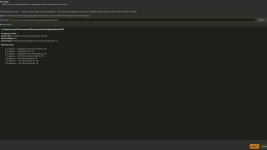
New Mod files wizard page (between Review and Run) auto-detects mod-specific XMLs in the source save and offers a per-file checklist:
Safe mod data (pre-checked): RedTape.xml, rm_RlAnimalSystem.xml (Realistic Livestock genetics), rm_RlSettings.xml, FS25_UnloadBalesEarly.xml, easyDevControls.xml.
Map-bound (unchecked by default on cross-map): Courseplay.xml, AutoDrive*, precisionFarming.xml, mapObjectsHider.xml, treePlant.xml, treeMarker.xml, cropRotationPlanner.xml, npc.xml.
Binary terrain caches (.grle / .gdm / densityMap_*) never offered would break on a new map.
Same-map version upgrade mode
When source and target reference the same mapId (e.g. you’ve upgraded a map mod to a new version), the wizard flips defaults to preserve everything:
Orange “Same-map version upgrade detected” banner on the Target page.
Vehicle positions preserved exactly, hitched implements stay hitched.
Player-placed placeables (your built silos, sheds, pens) copied wholesale with all their content.
Silo / pen / storage dropdowns auto-pre-select matching uniqueIds.
Map-bound mod files (Courseplay, AutoDrive, precisionFarming, …) default ON.
Mod dependency list auto-merge
Source’s <mod> entries in careerSavegame.xml are merged into the new save (deduped by modName) so FS25 prompts the user to activate missing mods on first load — instead of silently dropping any objects that depend on them.
Minor fixes
Silo dropdown now picks up combined husbandry+silo placeables (animal pens with built-in grain storage).
Husbandry food / meadow / production-factor migration handles all three FS25 storage element shapes.
Identity-mapping skip in silo / animal / object-storage merges prevents content doubling when same-map mode copies placeables wholesale.
- Authors / Credits
- ConGan
- Download modification
- https://zippymods.com/zjahy9a4czku/UNZIP_FS25SavegameMover.zip.html

 Farming Simulator 25 Mods
 FS25 Maps
 FS25 Tractors
 FS25 Harvesters
 FS25 Trucks
 FS25 Trailers
 FS25 Vehicles
 FS25 Cars
 FS25 Buildings
 FS25 Implements
 FS25 Forklifts & Excavators
 FS25 Forestry
 FS25 Decorations
 FS25 Placeable objects
 FS25 Prefab
 FS25 Packs
 FS25 Weights
 FS25 Misc
 FS25 Textures
 FS25 Savegames
 FS25 Scripts
 FS25 Autodrive