Thank you for sharing the details of the latest version of the Realistic RayTracing Reshade Preset (v1.16.6.1). Here's a breakdown of the updates:
1. Compatibility:
- The preset is now compatible with the newest game version 1.16, ensuring that players can enjoy the realistic visual enhancements with the latest game updates.
- It is also compatible with the newest ReShade version 6.7.1, which adds new features and improvements to enhance the graphical fidelity.
2. Performance Improvements:
- The update includes improved performance, which can lead to smoother gameplay experiences while maintaining the realistic visuals provided by the Reshade preset.
3. Installation Instructions:
- To install the Realistic RayTracing Reshade Preset, players can follow the detailed tutorial provided via the link: [FS25 ReShade SHADER Tutorial](https://www.youtube.com/watch?v=KVh4A48hVy8). This tutorial likely offers step-by-step guidance on how to install and set up the ReShade preset effectively.
4. Usage Tips:
- To achieve the best results with the preset, it's recommended to use Reshade version 6.7.1 or newer in conjunction with the NiceGuyLighting configuration.
- Players should also remember to select the correct resolution settings each time they restart the game to ensure optimal visual quality and performance.
Overall, this update seems to enhance the Realistic RayTracing Reshade Preset by offering compatibility with the latest game and ReShade versions, along with performance improvements and detailed installation instructions to help players experience a more immersive and realistic visual upgrade in their gaming environment.
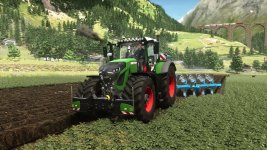





 FS25 ReShade SHADER Tutorial
 Farming Simulator 25 Mods
 FS25 Maps
 FS25 Tractors
 FS25 Harvesters
 FS25 Trucks
 FS25 Trailers
 FS25 Vehicles
 FS25 Cars
 FS25 Buildings
 FS25 Implements
 FS25 Forklifts & Excavators
 FS25 Forestry
 FS25 Decorations
 FS25 Placeable objects
 FS25 Prefab
 FS25 Packs
 FS25 Weights
 FS25 Misc
 FS25 Textures
 FS25 Savegames
 FS25 Scripts
 FS25 Autodrive