V1.4.0.0
– NEW: Added compatibility with “HUD Hider” mods (HUD aligns with game visibility).
– FIXED: Productivity (T/h) calculation bug causing sudden jumps.
– FIXED: GUI closing unexpectedly during gameplay.
– NEW: Interactive Combine Settings & Calibration Menu (RShift + K).
– NEW: Manual Control Mode – Adjust Fan, Rotor, Sieves, and Feeder.
– NEW: Incorrect settings cause additional Crop Loss (displayed in GUI).
– NEW: Profile System – Save/Load custom settings for each crop.
– NEW: New crops start with neutral (50%) settings, requiring calibration.
– NEW: Crop Loss display now shows +/- signs (- for losses, + for bonuses, 0 for optimal).
– NEW: Manual adjustment buttons (+/-) always visible in Calibration GUI for easier tuning.
– FIXED: Camera rotation properly blocked when cursor is active (HUD drag/GUI interaction).
– FIXED: HUD resetting to off-screen positions. Added auto-fix and reset command.
– IMPROVED: Input blocking now uses proper camera.isRotatable method.
– IMPROVED: GUI hint text repositioned to prevent overlap with buttons.
– NEW: AUTO mode now applies slight random imperfection (1-10 units) – skilled manual tuning can outperform AUTO!
– NEW: Same loss math for AUTO and MANUAL modes – no more zero-loss bypass in AUTO.
– FIXED: Combine settings now correctly saved and loaded from savegame (vehicles.xml).
– FIXED: profileCount cache correctly restored after loading savegame.
– FIXED: Auto crop detection now server-side only – prevents random value desync in multiplayer.
– IMPROVED: All mod settings (server + client) now stored in modSettings/ folder.
– IMPROVED: Dedicated server fully supported – each vehicle retains its own calibration profile.
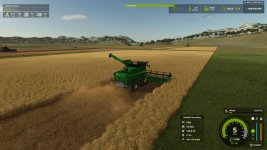
What does this mod do? This specific mod adds realism to the harvesting process. Your combine will no longer be able to harvest at full speed in dense crops! The speed is automatically limited based on the thresher load.
Key Features:
Realistic Load Calculation: The denser the crop and the wider the header, the slower the combine moves.
Info HUD: A compact display near the speedometer showing current Load.
Crop Loss System (Beta version visual only): If you push too hard, you might lose some yield (can be disabled).
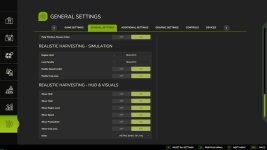
Difficulty Modes: Choose your playstyle in the game settings (ESC -> settings tab):
Arcade: Minimal speed restrictions. For relaxed gameplay.
Normal: Balanced experience. You will feel the weight of heavy crops like corn or wheat.
Realistic: For simulation fans. Speed is strictly limited by the combine’s physical capacity.
V1.3.2.0
– Physical crop loss system! Losses now reduce the actual amount of grain collected in the hopper. (Still in beta, may experience critical issues. Can be disabled in settings)
– Crop losses start at 95% engine load (was 100%).
– Progressive loss formula – higher overload = exponentially higher losses.
– Loss penalties now directly affect yield for more realistic gameplay.
– Settings menu reorganized into “Modeling” and “User Interface and Visual Effects”.
– Draggable UI! Right-click to toggle the cursor, then drag the UI to move it. (May cause issues with mods that use the same hotkeys, change the hotkey in settings to prevent this).
– Independent harvester control (optional).
– Interface metrics now instantly reset when the cutter is raised/stopped.
– Customizable interface content (toggling individual elements).
- Authors / Credits
- exekx
- Download modification
- https://zippymods.com/spcm7y75esl3/FS25_RealisticHarvesting.zip.html

 Farming Simulator 25 Mods
 FS25 Maps
 FS25 Tractors
 FS25 Harvesters
 FS25 Trucks
 FS25 Trailers
 FS25 Vehicles
 FS25 Cars
 FS25 Buildings
 FS25 Implements
 FS25 Forklifts & Excavators
 FS25 Forestry
 FS25 Decorations
 FS25 Placeable objects
 FS25 Prefab
 FS25 Packs
 FS25 Weights
 FS25 Misc
 FS25 Textures
 FS25 Savegames
 FS25 Scripts
 FS25 Autodrive