Radio Enhancements – Partybox Update.
This script adds some useful enhancements to the in-game radio.
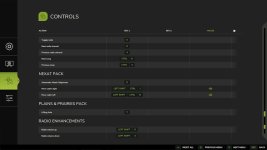
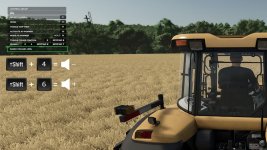
1. You can now change the radio volume in vehicles at any time without opening the menu.
Default keys:
– Left Shift + 4 quieter
– Left Shift + 6 louder
The keys can be changed in the menu settings.
2. The current radio volume is shown for a short time in the F1 menu and then disappears again.
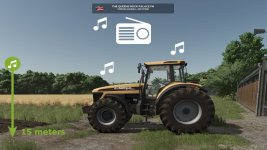
3. If you leave a vehicle while a radio station is switched on, you can continue to hear the radio up to a certain distance.
– after leaving the vehicle, the volume is reduced to 20% of the current value (can be changed)
– if you move away from the vehicle, the music becomes quieter and quieter (maximum distance can be changed)
– if you move closer again, the volume slowly increases again
– the radio must be switched off manually in the vehicle to disable this function
– the radio state (on/off) is saved individually for each vehicle
– helpers switch the radio on by default – you can hear it when driving past
 (helper radio can be disabled / changed)
– a RadioEnhancements.xml file is created in the modSettings folder where you can change values
4. Multiplayer
– the script synchronizes the radio state (on/off) and the volume of your multiplayer vehicles
– if another player drives past you with the radio switched on, you will hear it too
– internet radio streams are synchronized with your multiplayer partners if you have also set them globally on your side
5. Partybox (Changelog 1.2.0.0)
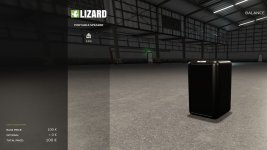
– you can buy a portable speaker in the shop under Miscellaneous > Miscellaneous
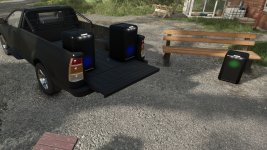
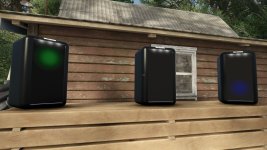
– this Partybox can be carried anywhere and, if desired, continuously plays your radio stations / music everywhere
– to use it, simply “enter” the speaker and check the F1 menu
– the Partybox has its own volume control, independent of everything else
– animated party lights of the speaker can be enabled in the F1 menu and are multiplayer compatible
What I unfortunately cannot change
– unfortunately it is not possible to save specific radio stations for individual vehicles
– all vehicles and speakers still globally use the same preferred station selected by you
– in multiplayer, you always hear the radio station currently selected client-side on your own game in other players’ vehicles, not the other player’s station
- Authors / Credits
- TRIDENTE
- Download modification
- https://zippymods.com/7khck8owpxuj/FS25_RadioEnhancements.zip.html


 Farming Simulator 25 Mods
 FS25 Maps
 FS25 Tractors
 FS25 Harvesters
 FS25 Trucks
 FS25 Trailers
 FS25 Vehicles
 FS25 Cars
 FS25 Buildings
 FS25 Implements
 FS25 Forklifts & Excavators
 FS25 Forestry
 FS25 Decorations
 FS25 Placeable objects
 FS25 Prefab
 FS25 Packs
 FS25 Weights
 FS25 Misc
 FS25 Textures
 FS25 Savegames
 FS25 Scripts
 FS25 Autodrive