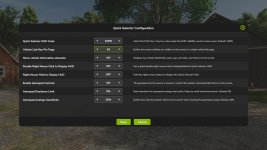



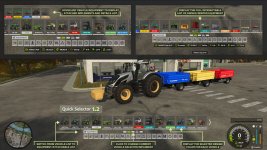
The Quick Selector enhances gameplay with an intuitive user interface, offering additional game functions and quick access to essential vehicle and game controls.
It features the list of personal vehicles and implements, additional vehicle information and the possibility to operate selected vehicle/implement functions with a click.
By default, the HUD can be opened with a (Double Right Mouse Click) or via configurable keys:
– Keyboard: Right CTRL key
– Gamepad Open HUD: button (Arrow Down + Square) on PS / (Arrow Down + X) on Xbox
– Gamepad Click Item: button (X) on PlayStation / (A) on Xbox
Key Features:
– Selectable Vehicles: Paginated list of owned or rented vehicles and implements
– Vehicle Controls: Start the engine, enter or exit vehicles, toggle attachments,
operate implements (power on, folding, lowering, unloading), and control cruise speed.
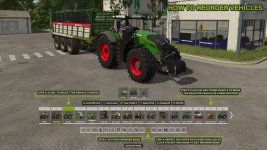
– Vehicle Reordering: Reorganize vehicles in the list, which also updates their tab order.
– Lights Control: Switch vehicle lights, all lights, front/backlights, beacon, and hazard lights.
– AI and Helpers: Open AI screens and hire helpers.
– Game Management: Open menus, access the shop, save the game, adjust settings, and exit.
Important Notes:
– Controls: When the HUD is open, all controls from (Keyboard, Mouse or Gamepad) are used to interact with Quick Selector elements (moving the cursor, select vehicle, click buttons).
Only the vehicle’s acceleration and brake inputs remain available.
– Gamepads: For quicker access, it’s recommended to change the HUD opening input from (Arrow Down + Square/X) to (Square/X) and remap the default vehicle enter/exit input from (Square/X) to (Arrow Down + Square/X) to prevent conflicts.
– No multiplayer support for now.
V1.2.0.0
Update 1.2 brings a major overhaul with additional features and improvements!
– Display and manage the full list of owned or rented equipment (vehicles and attachable).
– To reduce on-screen clutter, attached implements and vehicle info are now displayed only when you hover over a vehicle or an item.
– Clicking on an attachable teleports the player directly to its location.
– To make vehicles easier to identify, the list now shows the design color of each vehicle.
– Attached implement selection has been added above the quick buttons to improve usability.
– Multiple new details have been added to the vehicle/implement info screen, including needed power, fill level/capacity, mass, and working width.
New buttons (*) added to Quick Buttons list:
– Power On:
– | Change Seed*
– Unload
– | Change Tip Side* | Toggle Trailer Cover*
– Time Scale*
– | Pause* | Realtime* | Increase* | Decrease*
– Open Menu
– | Toggle Help Text* (Top left keybindings menu)
– Shop
– | Sell / Return Vehicle*
- Authors / Credits
- Quity
- Download modification
- https://zippymods.com/51xah88x9irr/FS25_QuickSelector.zip.html

 Farming Simulator 25 Mods
 FS25 Maps
 FS25 Tractors
 FS25 Harvesters
 FS25 Trucks
 FS25 Trailers
 FS25 Vehicles
 FS25 Cars
 FS25 Buildings
 FS25 Implements
 FS25 Forklifts & Excavators
 FS25 Forestry
 FS25 Decorations
 FS25 Placeable objects
 FS25 Prefab
 FS25 Packs
 FS25 Weights
 FS25 Misc
 FS25 Textures
 FS25 Savegames
 FS25 Scripts
 FS25 Autodrive