


With the PowerTools menu you have quick and easy access to some “quality of life” features. Especially useful if you are a modder or content creator.
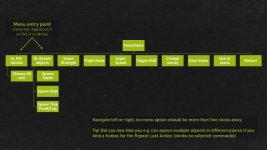
Using a single key/button (default F12) you activate the PowerTools menu. From there you can quickly navigate to the different functions without the need for a mouse or navigating through multiple menus.
MAIN FEATURES:
– Remove trees via keyboard shortcut (see notes)
– Add/remove money to your farm
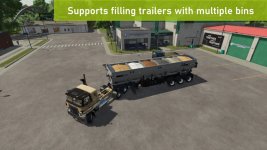
– Fill vehicle – supports vehicles with multiple tanks/storage units and accepts any filltype supported by the vehicle *
– Spawn any type of pallet (including production materials like sugar and clothes)
– Spawn any type of bale – supports round/square, all sizes and all types (straw, silage, cotton etc) *
– Spawn tree logs – currently only supports limited number of lengths *
– Toggle super speed, super strength or flight mode
– Quickly save the current game, ether via hotkey or the menu *
– Toggle HUD/interface on/off (now with quick command: hold F1/help menu button for ~1 second)
– Repeat last command
– Open PowerTools menu in alternate mode:
— Restart and exit to menu uses the “hard reset” method instead of “soft reset”
— Change UI scale (will be reset on restart, to permanently change the UI scale use the game settings instead)
– A limited PowerTools menu can now be opened when main menu is open as well as when the game is paused
– Additional time scales, hold decrease button (default: 7) to pause time, and hold increase button (default: 8) to enable/disable additional speeds *
– Change field state (crop type, growth stage, ground type etc)
NOTES:
1. Features marked with an asterisk (*) isn’t available on dedicated servers, only in singleplayer and self-hosted multiplayer.
2. Many of the features requires that you have admin access (to prevent cheating in multiplayer) – in single player everyone is admin though

3. To be able to use “Repeat last action” you need to bind a hotkey in the input binding settings
4. The new alternate mode menu uses a separate hotkey (default Right Ctrl + F12)
5. For players with a keyboard that doesn’t have the WASD layout, e.g. AZERTY, the key binding for ascending/descending (default: Q/E) in flight mode can be different (e.g. use keys A/E for AZERTY layout)
6. The Remove Tree tool doesn’t have any default keybinding (to limit the risk of accidental deletion of trees) – before using the tool, configure your keybindings and look for ‘Remove Tree’
7. In multiplayer, trees can only be deleted on land you own (everywhere if you are the server admin). In singleplayer, you can delete trees everywhere.
V1.2.0.0
– HOTFIX: Prevent non-admins from accessing the Field Options menu [#38, #51]
– NEW: Remove Tree function (no default keybinding, see notes above)
– FIX: Prevent script errors in ‘keyEvent’ (“invalid argument #1 to ‘pairs’ (table expected, got boolean”) [#36]
– FIX: No more LUA error “attempt to index nil with ‘l10n'” when saving [#43]
– FIX: Prevent the field menu to show on non-field farmland [#50]
– FIX: Ensure the field menu can only be activated on owned land [#49]
– FIX: Prevent the fill menu to appear on vehicles without useable fill units (e.g. tree planter Damcon PL75) [#32]
- Authors / Credits
- w33zl
- Download modification
- https://zippymods.com/a9ejo2eask34/FS25_PowerTools.zip.html

 Farming Simulator 25 Mods
 FS25 Maps
 FS25 Tractors
 FS25 Harvesters
 FS25 Trucks
 FS25 Trailers
 FS25 Vehicles
 FS25 Cars
 FS25 Buildings
 FS25 Implements
 FS25 Forklifts & Excavators
 FS25 Forestry
 FS25 Decorations
 FS25 Placeable objects
 FS25 Prefab
 FS25 Packs
 FS25 Weights
 FS25 Misc
 FS25 Textures
 FS25 Savegames
 FS25 Scripts
 FS25 Autodrive