


FS25 Object Storage Extension V1.0

  • Thread Author
object-storage-extension-v1.0-1.jpg


object-storage-extension-v1.0-6.jpgobject-storage-extension-v1.0-5.jpgobject-storage-extension-v1.0-4.jpgobject-storage-extension-v1.0-3.jpgobject-storage-extension-v1.0-2.jpgobject-storage-extension-v1.0-1.jpg

An extension for the base game ‘Object Storage’ system that brings back some of the features found in the original ‘Object Storage’ mod (FS17 – FS22).
Along with improving some existing features it is also now possible for users to adjust building configurations so you can play your way.

Global Menu:
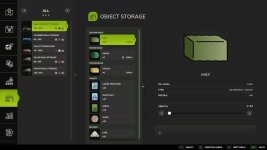
A new tab is now included as part of the In-Game Menu allowing easy viewing and spawning of all stored objects.
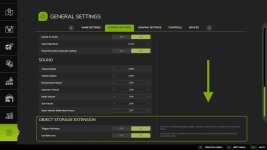
It is possible to adjust some menu options from the ‘General Settings’ screen.

Configuration – Input Trigger:
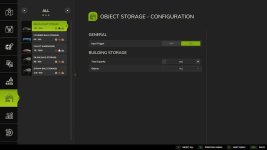
It is now possible to disable each buildings input trigger, helping you avoid unwanted delivery of objects.

Configuration – Capacity:
Do you have a building that stores too many objects for your realistic gameplay or would you love just a little more space? Now you can easily adjust the capacity of your storage buildings to a number you are happy with.

Configuration – Object Types:
Wishing you could limit a building to bales or pallets only? This is no longer a problem, simply select the object type you wish to store.

Improvement – Packed Bales:
Object storage buildings now fully support packed bales, allowing them to be cut open once removed from storage.

Improvement – Fermenting Bales:
Fermenting bales are now correctly grouped in the menu, dialog and info pop-up once fermenting is complete without requiring a game restart.

Improvement – Multiplayer Bale Colours:
Bale colours are now synced in multiplayer games instead of the default white. To reduce unnecessary network bandwidth bales of the same fill type and size will use the colour of the first bale added to storage similar to a single-player game.

NOTE:
There are more updates planned to include extra modding options, these will be released as they are completed.
 
This extension for the base game's Object Storage system sounds like a valuable addition, bringing back beloved features from the original Object Storage mod while also introducing new functionalities and enhancements. Let's delve into the key points mentioned in the forum post:

1. **Global Menu**: The inclusion of a new tab in the In-Game Menu for viewing and spawning all stored objects makes managing stored items more convenient. The ability to adjust menu options from the General Settings screen adds customization and flexibility to the gameplay experience.

2. **Configuration - Input Trigger**: The option to disable each building's input trigger provides greater control over which objects are delivered to storage, helping to prevent unwanted material accumulation.

3. **Configuration - Capacity**: Customizing the storage capacity of buildings allows players to tailor their storage solutions to match their preferred gameplay style. This feature enables players to adjust the storage space available based on their needs.

4. **Configuration - Object Types**: The ability to specify the type of objects (e.g., bales or pallets) that a building can store adds specificity and organization to the storage process, streamlining gameplay and facilitating better resource management.

5. **Improvement - Packed Bales**: Full support for packed bales in object storage buildings enhances realism and functionality, enabling players to interact with bales more naturally within the storage system.

6. **Improvement - Fermenting Bales**: Proper grouping of fermenting bales in menus and dialogues post-fermentation completion, without requiring a game restart, enhances user experience and convenience during gameplay.

7. **Improvement - Multiplayer Bale Colors**: Synchronized bale colors in multiplayer games and the optimization of network bandwidth reduce unnecessary data traffic, improving the multiplayer experience while maintaining visual consistency for bales.

Additionally, the note about upcoming updates introducing extra modding options indicates a commitment to continued development and enhancement of the extension based on user feedback and evolving needs within the gaming community.

Overall, these features and improvements aim to offer players a more immersive and customizable object storage experience in the game, enriching gameplay and enhancing user control and satisfaction.
 
FS25 Sidebar Menu (PNG Icons)

FS25Mods.com - Download Farming Simulator 25 Mods for FREE

Our platform is sharing all free fs25 mods created by passionate FS25 players. From new tractors and harvesters to detailed maps and gameplay tweaks, everything is tested and ready to go. Finding and installing mods is super easy. Just browse by category, pick what you like, and download fast for free. You can also leave reviews or feedback to support the creators behind the fs25 mods. Whether you’re new to the game or you’ve been modding for years, FS25Mods.com is a great place to discover latest game mods for FS25 game.

Back
Top