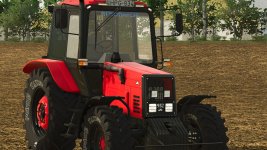
For the Belarus 952 2010-2020 V1.0 in FS25, here is a detailed breakdown of the configurations you can customize:
1. **Engine**: You can choose from different engine options available for the Belarus 952, each with varying horsepower and performance characteristics. Select an engine that suits your needs and power requirements.
2. **Appearance**: Personalize the appearance of your Belarus 952 by customizing the color and design. You may also be able to add or remove various visual components such as fenders, lights, mirrors, and more.
3. **Wheels**: Select the type of wheels that best fit the terrain you will be working on. Choose between standard, wide, narrow, dual, or other specialized wheel configurations.
4. **Sticker**: Add decals, logos, or stickers to give your Belarus 952 a unique and customized look. You can choose from a variety of pre-designed stickers or create your own custom designs.
5. **License Plate**: Personalize your license plate with your own text or numbers to make your Belarus 952 stand out.
6. **Exhaust**: Customize the exhaust system by selecting different exhaust pipe designs or configurations. You can choose from a standard exhaust setup or opt for a more performance-oriented design.
Remember that to interact with these configurations and make changes in real-time, the "Interactive Control" mod is required. This mod enables you to access and manipulate various parts and configurations of the tractor within the game environment. With "Interactive Control," you can seamlessly customize the engine, appearance, wheels, stickers, license plate, exhaust, and more according to your preferences.

 Farming Simulator 25 Mods
 FS25 Maps
 FS25 Tractors
 FS25 Harvesters
 FS25 Trucks
 FS25 Trailers
 FS25 Vehicles
 FS25 Cars
 FS25 Buildings
 FS25 Implements
 FS25 Forklifts & Excavators
 FS25 Forestry
 FS25 Decorations
 FS25 Placeable objects
 FS25 Prefab
 FS25 Packs
 FS25 Weights
 FS25 Misc
 FS25 Textures
 FS25 Savegames
 FS25 Scripts
 FS25 Autodrive