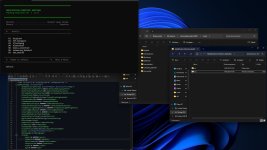
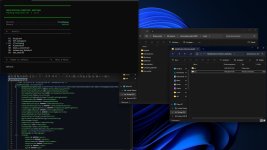
This handy tool simplifies organizing and switching between your mods.
Create subfolders within the directory:
“Documents/My Games/FarmingSimulator2025\mods”
Here, you can save different profiles for maps, savegames, or playstyles.
The tool automatically updates the mod folder path in “gameSettings.xml” to switch profiles seamlessly.
Important:
– Runs in PowerShell, no installation required.
– Works solely with folder paths; no files are modified.
– The mod path is changed securely to activate only the desired mods.
Security:
This script is a simple path management tool and contains no malware.
Quick Start:
1. Unzip the archive.
2. Ensure your mod folder is located at “Documents\My Games\FarmingSimulator2025\mods”.
3. Launch “run.bat”.
4. Follow the menu prompts to switch profiles or reset to default.
Note:
Farming Simulator 2025 must be closed before using the tool, so changes take effect.
V2.0.0.0
Multilingual interface (German & English)
First-run setup assistant on initial launch
Create and manage profiles directly in the tool
Automatic saving of custom paths
Profile details with mod list and file sizes
Overview showing profile and mod counts
Switch history (last 5 changes)
Warning if FS25 is still running during switching
Exit screen on shutdown
Various bug fixes and stability improvements
- Authors / Credits
- dorschi151
- Download modification
- https://zippymods.com/10mw5rvl2di7/ModificationDirectorySwitcherV2.zip.html

 Farming Simulator 25 Mods
 FS25 Maps
 FS25 Tractors
 FS25 Harvesters
 FS25 Trucks
 FS25 Trailers
 FS25 Vehicles
 FS25 Cars
 FS25 Buildings
 FS25 Implements
 FS25 Forklifts & Excavators
 FS25 Forestry
 FS25 Decorations
 FS25 Placeable objects
 FS25 Prefab
 FS25 Packs
 FS25 Weights
 FS25 Misc
 FS25 Textures
 FS25 Savegames
 FS25 Scripts
 FS25 Autodrive