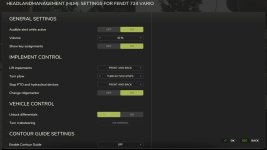
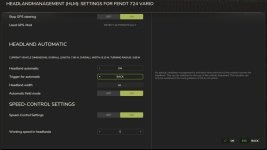

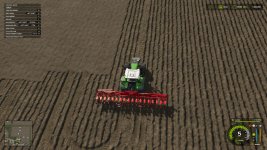
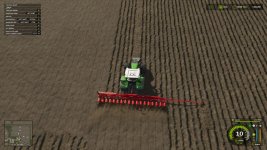
Headland management allows functions to be combined in the vehicle and activated together at the touch of a button to simplify turning manoeuvres during field work. All functions can be activated and deactivated individually for each vehicle via a GUI in order to achieve ideal adaptation to the work being carried out.
Headland management must be added to the respective vehicle as a one-off configuration in the shop or in the workshop before use. The cost for this is 3000$.
It can be activated and deactivated in the vehicle. Various buttons can also be configured for activation and deactivation.
Functions included:
– Reduce speed (cruise control) and raise again, reactivate cruise control if it was previously active
– Raise lowered implements and lower them again, optionally raise front implements before raising rear implements
– Turn the plough, single-stage or two-stage (via the centre position)
– Raise and change track markers
– Change sides with crab steering activated
– Switch off PTO shaft(s) and hydraulics and switch on again
– Warning tone when headland mode is activated
– On/off switch: The headland management can be switched on and off. This prevents accidental activation during transfer to the work site and improves road safety.
– Automatic headland management: Automatic activation of headland mode when the headland is reached. Optional return to field mode after completing the 180° turn.
– Option to temporarily deactivate the headland automatic headland by pressing a button
– Contour guidance: Automatic control along the field boundary or along the cultivated area
– The configuration is saved and restored for each device type
With existing EnhancedVehicle (FS25_EnhancedVehicle):
– Deactivate and reactivate GPS lane guidance, optionally trigger the turning function
– Release and reset active differential locks
– Use of EV headland detection if it has been activated
Pre-assigned key combinations (can be changed):
– Switch headland management on/off: (left) Shift + (left) Alt + X
– Switch operating mode (field mode/headland mode): (left) Shift + X
– Call up GUI for configuration: (left) Shift + (left) Ctrl + X
Other prepared key combinations (not pre-assigned)
– Temporarily deactivating/reactivating (toggling) the headland automatic function
– Temporarily deactivating the automatic headland function
– Reactivating the automatic
– Activation of the field mode
– Activation of the headland mode
V3.0.3.0
– Compatibility with CousePlay GPS Extension
- Authors / Credits
- Glowins Modschmiede
- Download modification
- https://zippymods.com/1p0e2x5cyent/FS25_HeadlandManagement.zip.html

 Farming Simulator 25 Mods
 FS25 Maps
 FS25 Tractors
 FS25 Harvesters
 FS25 Trucks
 FS25 Trailers
 FS25 Vehicles
 FS25 Cars
 FS25 Buildings
 FS25 Implements
 FS25 Forklifts & Excavators
 FS25 Forestry
 FS25 Decorations
 FS25 Placeable objects
 FS25 Prefab
 FS25 Packs
 FS25 Weights
 FS25 Misc
 FS25 Textures
 FS25 Savegames
 FS25 Scripts
 FS25 Autodrive