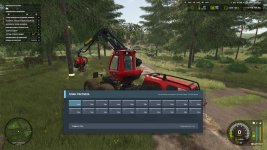
The addition of an overlay cutting plan for forestry machines sounds like a great feature for FS25 players who enjoy forestry activities in the game. Having the ability to open the plan overlay, select pieces, and adjust their length using the available cutting lengths for the forest machine can greatly enhance the realism and precision of logging operations in the game.
These default key bindings you've provided will allow players to easily navigate and manipulate the cutting plan overlay without having to rely solely on manual input. By incorporating shortcuts like Ctrl + W to switch the cutting plan overlay, Ctrl + X to cut by stages, Ctrl + A / Ctrl + D to navigate between different fragments, and Ctrl + Q / Ctrl + E to shorten or extend selected pieces, players can efficiently interact with the cutting plan interface and make adjustments as needed.
Overall, this feature offers players a more detailed and immersive forestry experience in FS25, allowing them to plan and execute logging operations with greater accuracy and efficiency. It adds a new layer of strategy and control to forestry activities in the game, which can be both challenging and rewarding for players looking to engage in realistic forestry management.

 Farming Simulator 25 Mods
 FS25 Maps
 FS25 Tractors
 FS25 Harvesters
 FS25 Trucks
 FS25 Trailers
 FS25 Vehicles
 FS25 Cars
 FS25 Buildings
 FS25 Implements
 FS25 Forklifts & Excavators
 FS25 Forestry
 FS25 Decorations
 FS25 Placeable objects
 FS25 Prefab
 FS25 Packs
 FS25 Weights
 FS25 Misc
 FS25 Textures
 FS25 Savegames
 FS25 Scripts
 FS25 Autodrive