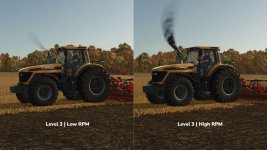
Want more smoke? Darker smoke? Or something completely your own?
With Exhaust Color Configurations, you can change the exhaust smoke of many vehicles
right in the shop or later in the workshop.
Standard – Keeps the original exhaust settings.
Level 1 – Darker and stronger.
Level 2 – Adds a little more.
Level 3 – For when you want some serious smoke.
Custom – Set your own color, transparency and smoke size.
The three preset levels and up to ten custom slots can be adjusted through the automatically
created FS25_exhaustColorConfigurations.xml file.
The file is located in the corresponding modSettings subfolder.
A German/English README with explanations of color, alpha, scale and the Min/Max behavior is also placed there.
Want to use different values later? Vehicles you already own keep their saved settings.
To apply new values, select a different exhaust level in the workshop and then select the desired
level or Custom again.
- Authors / Credits
- [Weekend Farmers]
- Download modification
- https://zippymods.com/uzq8b9yzbkmp/FS25_exhaustColorConfigurations.zip.html

 Farming Simulator 25 Mods
 FS25 Maps
 FS25 Tractors
 FS25 Harvesters
 FS25 Trucks
 FS25 Trailers
 FS25 Vehicles
 FS25 Cars
 FS25 Buildings
 FS25 Implements
 FS25 Forklifts & Excavators
 FS25 Forestry
 FS25 Decorations
 FS25 Placeable objects
 FS25 Prefab
 FS25 Packs
 FS25 Weights
 FS25 Misc
 FS25 Textures
 FS25 Savegames
 FS25 Scripts
 FS25 Autodrive