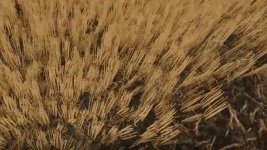
Cut wheat / barley texture
download then unpack select tire track or not tire track copy wheat and paste into farming simulator 25 data foliage wheat and replace then copy barley and paste into farming simulator 25 data foliage barley and replace
This sounds like a detailed set of instructions for modifying the wheat and barley textures in Farming Simulator 25. Here's a breakdown of the steps mentioned:
1. Download and unpack the file containing the modified wheat and barley textures.
2. Select whether you want the tire tracks included or not.
3. Copy the wheat texture and paste it into the 'farming simulator 25 data foliage wheat' directory, replacing the existing texture.
4. Copy the barley texture and paste it into the 'farming simulator 25 data foliage barley' directory, replacing the existing texture.
It's essential to follow these steps accurately to ensure the new textures are applied correctly in the game. Make sure to back up any original files before replacing them. If you encounter any issues or have further questions, feel free to ask for assistance.
FS25Mods.com - Download Farming Simulator 25 Mods for FREE
Our platform is sharing all free fs25 mods created by passionate FS25 players. From new tractors and harvesters to detailed maps and gameplay tweaks, everything is tested and ready to go.
Finding and installing mods is super easy. Just browse by category, pick what you like, and download fast for free. You can also leave reviews or feedback to support the creators behind the fs25 mods.
Whether you’re new to the game or you’ve been modding for years, FS25Mods.com is a great place to discover latest game mods for FS25 game.


 Farming Simulator 25 Mods
 FS25 Maps
 FS25 Tractors
 FS25 Harvesters
 FS25 Trucks
 FS25 Trailers
 FS25 Vehicles
 FS25 Cars
 FS25 Buildings
 FS25 Implements
 FS25 Forklifts & Excavators
 FS25 Forestry
 FS25 Decorations
 FS25 Placeable objects
 FS25 Prefab
 FS25 Packs
 FS25 Weights
 FS25 Misc
 FS25 Textures
 FS25 Savegames
 FS25 Scripts
 FS25 Autodrive