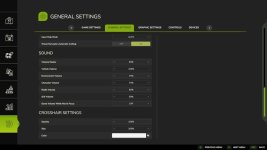
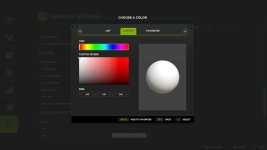
That's great to hear about the new features added to customize the default crosshair in the game! With the addition of color selection, size adjustment, and opacity settings, players can personalize their crosshair according to their preferences.
The color picker with predefined colors from the game, favorites, and custom selection (RGB) offers a wide range of possibilities for players to choose from. This feature allows players to match their crosshair color with their gameplay style or aesthetic preferences.
The size setting, ranging from 50% to 300% with a default of 100%, gives players the flexibility to adjust the size of the crosshair based on their display preferences or visibility needs. This feature can help improve aiming accuracy and enhance the overall gaming experience.
The opacity setting, which ranges from 0% (invisible) to 100% (fully visible) with a default of 50%, enables players to fine-tune the transparency of the crosshair according to their gameplay environment or personal preference. This can be particularly useful for maintaining focus on targets while keeping the crosshair visible.
Overall, the addition of these customization options in the latest updates (Changelog 1.1.0.0 and 1.1.1.0) enhances the player experience by allowing for a more personalized and tailored crosshair setup in the game. Players can now adjust the color, size, and opacity of their crosshair to suit their individual playstyle and visual preferences.

 Farming Simulator 25 Mods
 FS25 Maps
 FS25 Tractors
 FS25 Harvesters
 FS25 Trucks
 FS25 Trailers
 FS25 Vehicles
 FS25 Cars
 FS25 Buildings
 FS25 Implements
 FS25 Forklifts & Excavators
 FS25 Forestry
 FS25 Decorations
 FS25 Placeable objects
 FS25 Prefab
 FS25 Packs
 FS25 Weights
 FS25 Misc
 FS25 Textures
 FS25 Savegames
 FS25 Scripts
 FS25 Autodrive