FS25 Centralized Database Manager V1.0

  • Thread Author
centralized-database-manager-v1.0-1.jpg


centralized-database-manager-v1.0-5.jpgcentralized-database-manager-v1.0-4.jpgcentralized-database-manager-v1.0-3.jpgcentralized-database-manager-v1.0-2.jpgcentralized-database-manager-v1.0-1.jpg

Centralized Storage & VS Code Tooling for Modders
FS25_DBAPI is a streamlined persistence layer for Farming Simulator 25 mods. It replaces fragmented data handling with a centralized, JSON-backed FlatDB and provides a simple global API (g_globalMods[“FS25_DBAPI”].DBAPI) for namespaced key/value storage.

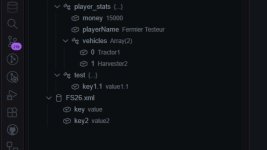
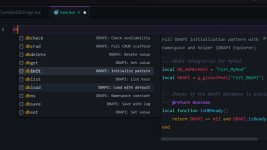
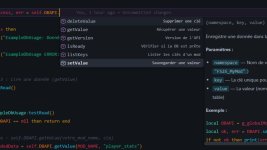
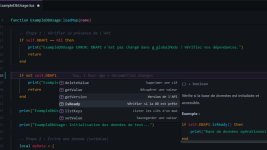
To supercharge your workflow, it comes with a dedicated VS Code extension featuring IntelliSense, snippets, and a live tree view to inspect your database files directly in the editor.

Why use FS25_DBAPI?
– Zero Overhead: A minimal, savegame-safe persistence layer that requires no external database engines.
– Intuitive API: Clean methods for getValue, setValue, listKeys, and deleteValue.
– Developer Velocity: Drastically speed up coding with autocomplete, snippets, and workspace visualization.
– Cross-Mod Compatibility: Simplify data sharing between mods and streamline migrations between savegames.
– Scalable: Lightweight enough for tiny utility mods, yet robust enough for complex modpacks.

Quick Start for Developers

Install the Mod
Drop the release ZIP into your mods/ folder and load your savegame to initialize the API.

Setup the VS Code Extension
Navigate to the vscode-extension directory and run:

Bash
npm run compile
npm run package

Install the resulting .vsix via VS Code (Extensions → Install from VSIX…).

Code Examples
Set a configuration value:

Lua
local DBAPI = g_globalMods[“FS25_DBAPI”] DBAPI.setValue(“MyMod”, “config.playerSpeed”, 12.5)

Read with a fallback default:

Lua
local DBAPI = g_globalMods[“FS25_DBAPI”] local speed = DBAPI.getValue(“MyMod”, “config.playerSpeed”, 10)

Get Involved
We’re looking for feedback! Whether you want to report a bug, request a feature, or propose an integration, join the conversation on GitHub.
 
Authors / Credits
LeGrizzly
Download modification
https://zippymods.com/4vdlfc7sjoog/unzip_FS25_DBAPI.zip.html
FS25_DBAPI seems like a fantastic tool for modders working on Farming Simulator 25. Here's a breakdown of some of its key features and benefits:

1. **Centralized Storage with FlatDB**: By using a JSON-backed FlatDB, FS25_DBAPI simplifies data handling by providing a centralized storage solution for mods. This eliminates the need for fragmented data management across different files.

2. **Global API**: The global API (`g_globalMods[“FS25_DBAPI”].DBAPI`) offers a streamlined way to access the persistence layer, making it easier to interact with the stored data through simple methods like `getValue`, `setValue`, `listKeys`, and `deleteValue`.

3. **VS Code Extension**: The dedicated VS Code extension enhances the development experience with features like IntelliSense for auto-completion, snippets for quick code generation, and a live tree view for visualizing database files directly within the editor.

4. **Benefits of Using FS25_DBAPI**:
- **Zero Overhead**: The tool is lightweight and does not require external database engines, making it safe for use in savegame environments.
- **Intuitive API**: The clean and easy-to-use API methods simplify data operations, leading to faster development workflows.
- **Developer Velocity**: Features like autocomplete, snippets, and workspace visualization can significantly boost coding speed and efficiency.
- **Cross-Mod Compatibility**: Enables easy data sharing between mods and facilitates smooth transitions when migrating data between savegames.
- **Scalability**: Suitable for a wide range of mod types, from small utility mods to complex modpacks.

5. **Quick Start for Developers**:
- Installing the mod involves dropping the release ZIP into the mods/ folder and loading your savegame to initiate the API.
- Setting up the VS Code extension includes navigating to the vscode-extension directory and running the specified commands to compile and package the extension for installation in VS Code.

6. **Code Examples**:
- Setting a configuration value using `setValue`.
- Reading a value with a fallback default using `getValue`.

7. **Get Involved**:
- The developers welcome feedback, bug reports, feature requests, and integration proposals on GitHub, encouraging community participation to improve the tool further.

Overall, FS25_DBAPI appears to be a valuable resource for modders seeking efficient data management and improved development workflows in Farming Simulator 25.
 
FS25 Sidebar Menu (PNG Icons)

FS25Mods.com - Download Farming Simulator 25 Mods for FREE

Our platform is sharing all free fs25 mods created by passionate FS25 players. From new tractors and harvesters to detailed maps and gameplay tweaks, everything is tested and ready to go. Finding and installing mods is super easy. Just browse by category, pick what you like, and download fast for free. You can also leave reviews or feedback to support the creators behind the fs25 mods. Whether you’re new to the game or you’ve been modding for years, FS25Mods.com is a great place to discover latest game mods for FS25 game.

Back
Top