
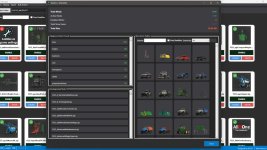
I was looking for a Mod Manager because I needed one. Actually, there’s only one Mod Manager on the market, but my antivirus software detects a malicious file. So I decided to create one myself. I have almost no coding knowledge, so I thought the most logical thing to do was to create one with AI assistance. I created this software with the help of Gemini and Claude. Everything works fine for me. I’m publishing it so others can benefit from it. There may be some shortcomings, and you can point out your requests. I’ll try to fix and add to it in my free time. Currently, the only problem is that it’s a bit slow, but as I said, it worked flawlessly for me, and I will continue to use it.
Technically, it works with the storeData data in the modDecs.xml and the XML files within the storeItems folder. Logically, it should work in all FS games with this structure. I developed and tested it for FS25.
V2.0.0.0
The main mod catalog has been changed. Now, to EDIT a mod, simply click on the relevant mod. Mods that don’t have an EDIT function have a red X in the left corner.
There are now various functions in the top bar: Statistics, Backup, Export, and Batch Operations.
The Statistics window displays the total number of mods, the number of active and inactive mods, the total number of items visible in the store, and the total size.
The Statistics window has 3 main sections: how many mods are in each category, non-category mods (generally script mods), and an area where you can see the item content of all mods in the store (search function and clickable items are active).
The backup function is useful for backing up all mods to a desired location. Similarly, there is a restore option, and both functions work comparatively (whether similar mods exist or not).
The export option outputs all mods as TXT and JSON files, including their names, creators, versions, and sizes. You can use this to send it to someone else.
Currently, the Bulk Operations menu only offers the function to activate or deactivate mods in bulk. More options may be added in the future based on requests.
The search function now works more thoroughly in all fields.
You can now only enter numbers in the Maximum Speed, Price, Lifespan, and Power sections of the EDIT window. I added this control mechanism to prevent potential accidents. Also, the Name section now allows you to change entries in different languages separately.
I added a Refresh button next to the Load Files button. It only adds the changes to the list without completely reloading the mods.
The program can now remember the location of the latest folder.
- Authors / Credits
- BUG05
- Download modification
- https://zippymods.com/p3mdepywlkfv/BUG_Mod_Manager_v2.zip.html

 Farming Simulator 25 Mods
 FS25 Maps
 FS25 Tractors
 FS25 Harvesters
 FS25 Trucks
 FS25 Trailers
 FS25 Vehicles
 FS25 Cars
 FS25 Buildings
 FS25 Implements
 FS25 Forklifts & Excavators
 FS25 Forestry
 FS25 Decorations
 FS25 Placeable objects
 FS25 Prefab
 FS25 Packs
 FS25 Weights
 FS25 Misc
 FS25 Textures
 FS25 Savegames
 FS25 Scripts
 FS25 Autodrive