FS25 Vehicle Control Addon v1.0

  • Thread Author
vehicle-control-addon-v1.0-1.jpg


vehicle-control-addon-v1.0-2.jpgvehicle-control-addon-v1.0-1.jpg

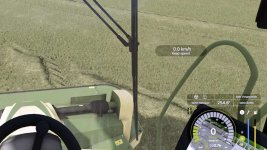
The vehicle control extension (VCA) combines many functions in one modification. Most features are turned off by default. VCA can automatically adjust the camera direction to the steering angle and direction of travel. So you always look in the direction you are driving. With the standard key combinations RShift and the arrow keys you can briefly look in the corresponding direction. The adaptive steering is intended for keyboard players. VCA can adjust the steering speed according to the speed of the vehicle.
The vehicle control extension also includes simple lane guidance. If you press Ctrl Left together with W, the direction of travel is aligned with fixed directions.

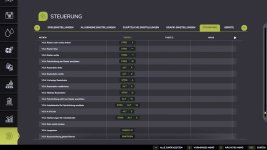
All functions can also be switched off again using the following buttons:
[Ctrl Left + C]: Settings
[Ctrl Left + W]: Continue grid control
[Alt Left + W]: Restart grid control
[Shift Right]: Accelerator pedal limiter / reduced cruise control speed
[Shift Right + Arrow Key]: Look forward, back, left, right
(Control should be approximately like in the LS22, if that’s not the case, just add your own assignment)
 
Authors / Credits
Jannik7755365
Download modification
https://zippymods.com/3zkei1bxbdt6/FS25_VehicleControlAddon.zip.html
The vehicle control extension (VCA) in FS25 sounds like a comprehensive modification that enhances the driving experience in the game. Let's break down the key features and functionalities mentioned in your description:

1. **Automatic Camera Adjustment**: VCA automatically adjusts the camera direction to align with the steering angle and direction of travel, ensuring that players always have a clear view in the direction they are driving.

2. **Manual Camera Adjustment**: Players can use the standard key combinations RShift and the arrow keys to manually look briefly in specific directions, providing greater flexibility in camera control.

3. **Adaptive Steering**: Designed for keyboard players, this feature allows VCA to adjust the steering speed based on the vehicle's speed, providing a more realistic driving experience.

4. **Lane Guidance**: By pressing Ctrl Left together with W, players can align the direction of travel with fixed directions, making it easier to stay on the intended path.

5. **Function Controls**: Players can toggle various functions on and off using specific key combinations, such as [Ctrl Left + C] for Settings, [Ctrl Left + W] for Continue grid control, [Alt Left + W] for Restart grid control, and [Shift Right] for Accelerator pedal limiter / reduced cruise control speed.

6. **Camera View Adjustments**: Additionally, players can use [Shift Right + Arrow Key] to look forward, back, left, or right, providing more control over their viewing angles while driving.

Overall, the VCA seems to offer a versatile set of features to improve vehicle control and camera management in FS25, catering to different playstyles and preferences. Players can easily customize their experience by enabling or disabling specific functions based on their needs. It's great to see these enhancements to the gameplay mechanics in the latest version of the game.
 
FS25 Sidebar Menu (PNG Icons)

FS25Mods.com - Download Farming Simulator 25 Mods for FREE

Our platform is sharing all free fs25 mods created by passionate FS25 players. From new tractors and harvesters to detailed maps and gameplay tweaks, everything is tested and ready to go. Finding and installing mods is super easy. Just browse by category, pick what you like, and download fast for free. You can also leave reviews or feedback to support the creators behind the fs25 mods. Whether you’re new to the game or you’ve been modding for years, FS25Mods.com is a great place to discover latest game mods for FS25 game.

Back
Top