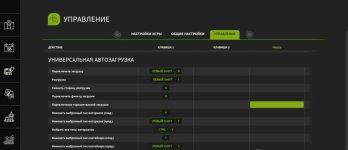
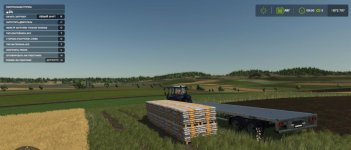
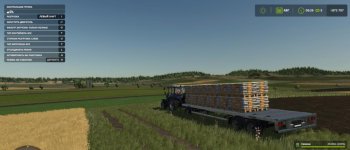
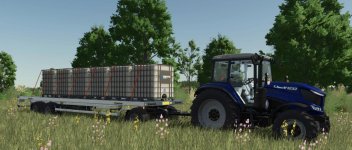
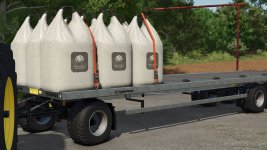
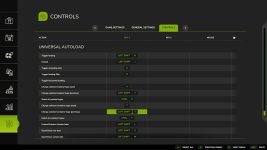
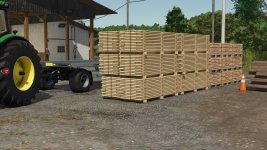
This automatically modifies the actual base game trailers, and will be applied to any new or existing trailers on your farm. Please see the included read-me file for instructions on adding to your own mod trailers or pallets.
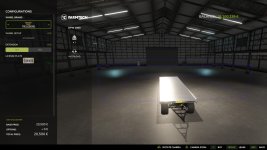
Autoloading specialisation for trailers. This automatically modifies the actual base game trailers, and will be applied to any new or existing trailers on your farm. Supported trailers can be configured with a GUI when purchasing in the shop. Please see the included read-me file for full instructions on configuration.
Changelogs:
v1.0.1.1 – Highlands DLC Latest
Added support for Highlands DLC
Added default configurations for new train carriages and cargo vessel
Corrected name of Timber Wagon train carriage (incorrectly named SugarBeet Wagon by GIANTS)
UAL will now search default configuration file for any undefined vehicles (mod settings file has priority)
Added ualRestoreDefaultConfigs console command – backs up existing settings file and replaces it with copy of defaults file only
Delay auto configuration in shop by 10 fames (some vehicles were not fully loaded when opening the shop, and therefore were not properly detected by the algorithm)
v1.0.1.0 – MODHUB UPDATE
Prevented some runtime errors
Improved loading of shipping containers
v1.0
This is identical to v0.4.9.9 but with version number set to v1.0.0.0 so that it works with the latest GIANTS mod version filter.
Since release on ModHub, only v1.0.0.0 and above will work with the game. Apparently GIANTS can do this dynamically now!
v0.4.9.9 – FINAL Pre-ModHub Release
Hide blue box in shop when UAL is disabled
Remove active vehicle debug display
NOTE: This version still includes the fix for tension belts broken in v1.9.0.1 but it will not be active in any future game versions due to the condition:
V0.4.9.4
Tested this time. Now adds TRIGGER flag to triggers if it is missing.
v0.4.9.2
As before, but previous fix only applied to placeables loaded from the savegame
Now applies to new placeables via PlaceableLoadingData.onPlacableLoaded
Search all placeables for i3d nodes where the name contains the word “trigger” and therefore should be a trigger and not an object
Remove any of the object collision flags that UAL uses to detect a collision (PLAYER, VEHICLE, STATIC_OBJECT, DYNAMIC_OBJECT, TREE)
v0.4.9.1
Search all placeables for i3d nodes where the name contains the word “trigger” and therefore should be a trigger and not an object
Remove any of the object collision flags that UAL uses to detect a collision (PLAYER, VEHICLE, STATIC_OBJECT, DYNAMIC_OBJECT, TREE)
v0.4.9.0
Objects not added as “loaded” when they intersect with both pickup and loaded triggers at the same time
Added as “loaded” when moving from both into the loaded trigger
Added as “available” when moving from both into a pickup trigger
Added some related visual debugging stuff
v0.4.8.9
Grouped too many state flags together in v0.4.8.8 which meant that a later logic statement could never be true
Also: Changed price per loading to INT – will truncate any existing floats to int (round down)
v0.4.8.8 – ADDED ACTIVE VEHICLE DEBUG DISPLAY & NEW GLOBAL SETTINGS
Update README and modDesc
Reorder items in global menu
Add active vehicle debug display – shown when debug mode is active
Detect players on foot – key bindings are not active yet
Add loadingSpeed global setting – delay in ms between loading each object
Added lowRefreshMode global setting – enable if you experience lag on lower end sytems or servers
Added BR Translations – provided by Myiamoto86
v0.4.8.7
Added 10% margin for pallet detection
I assume this was just a rounding error, maybe worse when pallets are not properly centred on the root node.
v0.4.8.5
Added global minLogLength option (sets a minimum length for logs that will be autoloaded)
Added minLogLength to the global settings menu
Now displays existing values (minLogLength and objectSpacing)
Loads custom values from mod settings XML and round to nearest in the menu
Only apply 1.9 bug fix to version game version 1.9.0.1 (expecting that GIANTS will fix)
v0.4.8.4 – Hopefully FINAL FIX for MP pallet bug
It looks like only pallets were affected by the bug anyway, not bales or logs
only add objects when the game is MP
only add objects if they are a “vehicle” (e.g. pallet)
only fix objects when they are no longer moving
clear table in case anything is added that shouldn’t have been or is later sold
Note: it seems like GIANTS may be calling link() for the pallets on the client, since the fix involves linking the object to the map root node (clearing the existing links) on the client. Calling the same code only on the server doesn’t change the behaviour.
v0.4.8.2
FIX TENSION BELTS – broken again in V1.9.0.1
NOTE: THIS IS A FIX FOR THE NEW GIANTS MP BUG – see #374 (comment)
Probably only temporary until GIANTS rolls out another patch
Workaround that seems to fix the pallets being dragged along the floor in MP after unstrapping tension belts
Added objectSpacing to global settings
v0.4.8.1 – Prevent debugging print error when loading unconventional vehicles in the shop
Protect against variables being nil
Update Italian translations
v0.4.8.0 – Second attempt to refactor container dimensions (see #386)
- Authors / Credits
- loki_79
- Download modification
- https://zippymods.com/s4wkwqe75pl0/FS25_UniversalAutoload.zip.html


 Farming Simulator 25 Mods
 FS25 Maps
 FS25 Tractors
 FS25 Harvesters
 FS25 Trucks
 FS25 Trailers
 FS25 Vehicles
 FS25 Cars
 FS25 Buildings
 FS25 Implements
 FS25 Forklifts & Excavators
 FS25 Forestry
 FS25 Decorations
 FS25 Placeable objects
 FS25 Prefab
 FS25 Packs
 FS25 Weights
 FS25 Misc
 FS25 Textures
 FS25 Savegames
 FS25 Scripts
 FS25 Autodrive