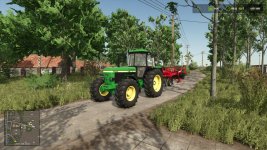

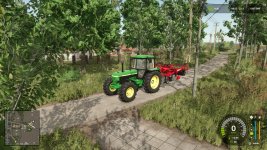
This Mod allows to turn off the HUD’s and zoom in the Camera to a preset FOV with the press of one Button to create more beautiful Screenshots.
It’s a Quality of Life Mod to quickly get into “Screenshot Mode” and back to regular without the help of several other Mods, Hotkeys or Console Commands.
The Default Screenshot-Mode FOV Settings is “30” because thats what I always use – but you can change this to your liking in the settings.xml
(Go to FarmingSimulator2025/modSettings/FS25_QuickScreenshotMode/settings.xml and change the FOV value to the value you want)
Hotkeys: Left-Alt + H -> toggle into and out of Screenshot Mode (can be changed in the Input Settings)
- Authors / Credits
- modelleicher (Farming Agency)
- Download modification
- https://zippymods.com/zrviazcpgwvq/FS25_QuickScreenshotMode.zip.html


 Farming Simulator 25 Mods
 FS25 Maps
 FS25 Tractors
 FS25 Harvesters
 FS25 Trucks
 FS25 Trailers
 FS25 Vehicles
 FS25 Cars
 FS25 Buildings
 FS25 Implements
 FS25 Forklifts & Excavators
 FS25 Forestry
 FS25 Decorations
 FS25 Placeable objects
 FS25 Prefab
 FS25 Packs
 FS25 Weights
 FS25 Misc
 FS25 Textures
 FS25 Savegames
 FS25 Scripts
 FS25 Autodrive