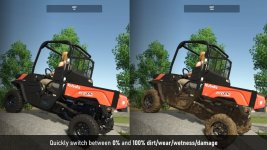
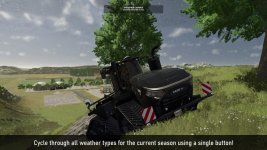
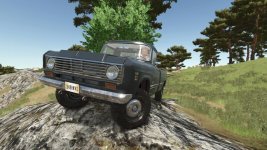
With this mod you can assign hotkeys to various testing functions, such as setting the wear, dirt, wetness and damage of the vehicle you’re currently in. You can also toggle the weather with a hotkey.
FEATURES:
– Change Vehicle Wear
– Toggle Vehicle Dirt
– Toggle Vehicle Wetness
– Toggle Vehicle Damage
– Vehicle Dirt and Wetness combo button (single press toggles dirt on/off, long press toggles wetness on/off)
– Vehicle Wear and Damage combo button (single press toggles wear on/off, long press toggles damage on/off)
– Double tap on the wetness hotkey toggles wetness debug mode on/off (gsVehicleDebugWetness)
– Reload Vehicle (requires long press to avoid accidental reloads)
– Toggle Weather (will cycle through the different weather types for the current season, e.g. sun, cloudy, rain, hail and twister)
– Each function can be assigned to a hotkey of your choice in the input bindings menu
– Each hotkey have multiple modes (single tap, double tap, hold), e.g. a single press on the wear hotkey will increase the wear with 20%, while a long press increse in 10% incremenets, and double press will toggle between 100% and 0% wear
By default, all hotkeys are unassigned to prevent conflicts with other mods, but you can easily assign them to any key you want in the input bindings menu.
Important! This mod is meant for testing and debugging purposes, and is not intended to be used in a regular playthrough. Always make sure to save your game before using the hotkeys, and use them with caution.
Note: In multiplayer, these functions can only be executed by the host.
- Authors / Credits
- w33zl
- Download modification
- https://zippymods.com/1ktc19kfxo1c/FS25_HotkeysforTesting.zip.html


 Farming Simulator 25 Mods
 FS25 Maps
 FS25 Tractors
 FS25 Harvesters
 FS25 Trucks
 FS25 Trailers
 FS25 Vehicles
 FS25 Cars
 FS25 Buildings
 FS25 Implements
 FS25 Forklifts & Excavators
 FS25 Forestry
 FS25 Decorations
 FS25 Placeable objects
 FS25 Prefab
 FS25 Packs
 FS25 Weights
 FS25 Misc
 FS25 Textures
 FS25 Savegames
 FS25 Scripts
 FS25 Autodrive