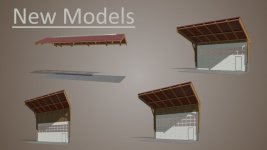
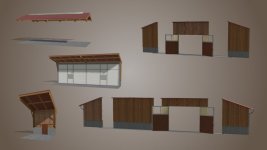
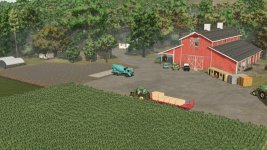
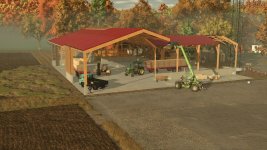
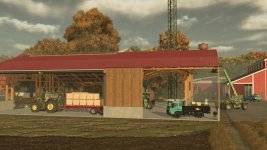
Well, who among you hasn’t always wanted to build your own hall in the game? What if you could not only design it, but also construct it entirely yourself – using building materials from your own farm? With this package, both are possible!
Since the whole thing can be a bit complex, I recommend trying it out in a test savegame first to avoid losing money on your main farm. Please activate Free Mode before placing anything, otherwise you might damage the construction site!
To make all building parts fit as precisely as possible, they were created without terrain adaptation. To still level the ground, there are four different “Leveler” blocks that serve solely to flatten the terrain. These have no base cost or maintenance and should be removed after placement.
How to proceed:
After leveling, place the gable walls first
Then the roof
Finally, the side walls – this prevents gaps
I also recommend using Grid Mode only and placing buildings at a 90° angle to the map. Other angles may cause overlaps.
When placing, make sure not to target the previous module, as this would cause them to be placed on top of each other.
For wider construction projects, the Leveler modules should be placed with some overlap to better visualize height differences. Unfortunately, these have to be hidden after a certain distance to preserve performance – a requirement from ModHub.
It’s also required by ModHub that Test Areas and Level Areas are included in the mod. So: activate Free Mode before placing anything!
General tips and notes:
– Be careful when placing the Modules. Placing them too fast can cause problems with the ingame physics.
– Level the ground with the Levelers first, then sell them
– Activate Free Mode when placing
– You cannot tip materials inside the halls
– Roofs only show visual snow, no mesh
– AI should not be started inside or near the halls
– AI cannot drive into them
– The triggers for manual building are intentionally small – precise driving is required
– Each module can be built manually. One construction phase takes about 8 hours to complete
Every module has the same basic structure
Price: $3,000 – $10,000 depending on the module
Price: $30 – $100 depending on the module when self-built
Maintenance: $1/day
Dimensions: 5m x 5m
Color selection for wooden walls and gates
The Models can be found in the buildings tab, or if you want to build them yourself, in the constructibles tab.
Almost every module can be configured in 5 different heights → Note: Some modules were not built in all heights if it didn’t make structural sense
Modules are divided into 4 groups:
Walls:
– Open side (also extended version)
– Closed side (also extended version)
– Window (also extended version)
– Door
– Segment gate
– Double width for segment gates and open walls -> Coming Soon
Roofs:
– Gable roof
– Flat roof
– Sloping canopy
– Rising canopy
– Roof corners, also inverted version
– With skylight/roof window and hall lighting -> Coming Soon
– Roof Edge – ! Only this can’t be constructed. Just placed
Gable walls:
In 3 sizes, configurable with gate, window, or none
Variable gable walls:
– Outer parts
– Inner parts
– Flat roof
– Flat roof with gate
– Gable roof
– Gable roof with gate -> Coming Soon
There are also additional free modules:
– Workshop (find it in the “tools” tab)
– Bale storage (find it in the “silos” tab)
– Pallet storage (find it in the “silos” tab)
V1.0.1.0
– Fixed: Large Door seems unfunctional
– Fixed: Some more collisions
– Added: Roof with Lights
– Added: Bigger Segment Doors
- Authors / Credits
- farmerfivetom
- Download modification
- https://zippymods.com/rkxcophc80k0/FS25_Hall_Configurator_Wood.zip.html


 Farming Simulator 25 Mods
 FS25 Maps
 FS25 Tractors
 FS25 Harvesters
 FS25 Trucks
 FS25 Trailers
 FS25 Vehicles
 FS25 Cars
 FS25 Buildings
 FS25 Implements
 FS25 Forklifts & Excavators
 FS25 Forestry
 FS25 Decorations
 FS25 Placeable objects
 FS25 Prefab
 FS25 Packs
 FS25 Weights
 FS25 Misc
 FS25 Textures
 FS25 Savegames
 FS25 Scripts
 FS25 Autodrive