FS25 Camera DoF V1.0

  • Thread Author
01.jpg
02.jpg03.jpg04.jpg


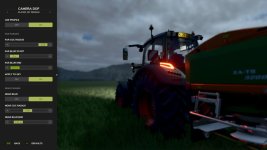
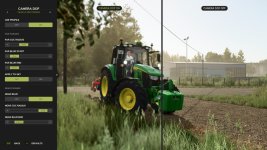
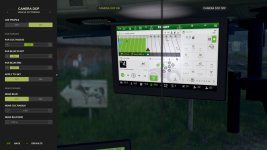
Adds cinematic depth to your gameplay by taking full control over the camera’s depth-of-field effect. Instead of relying on the game’s default blur settings, you can now fine-tune near and far blur independently for every camera perspective and see the changes in real time.
Features:
Configure 4 separate blur profiles: Vehicle 1st Person, Vehicle 3rd Person, Player 1st Person, and Player 3rd Person.
Adjust near and far blur parameters including CoC radius, blur distances, and sky application.
Enable or disable each profile individually — disabled profiles fall back to the game’s default DOF.
Reset any profile to built-in defaults with a single click. Settings are saved automatically.
Hotkeys:
Press ‘F6’ to open the Camera DoF settings dialog.
For more info, bug reports, or to contribute, check out GitHub (modnext/cameraDof).
 
Authors / Credits
aaw3k
Download modification
https://zippymods.com/e49znbupklpu/FS25_cameraDof.zip.html
The Camera DoF V1.0 mod sounds like a fantastic addition to your gameplay experience, as it allows you to have full control over the depth-of-field effect of the camera. By being able to adjust the near and far blur independently for different camera perspectives, you can achieve a more cinematic look tailored to your preferences.

The feature set of this mod is quite impressive. The ability to configure 4 separate blur profiles for different camera perspectives (Vehicle 1st Person, Vehicle 3rd Person, Player 1st Person, and Player 3rd Person) gives you a high level of customization. Additionally, being able to adjust parameters such as CoC radius, blur distances, and sky application allows for even more fine-tuning of the effect.

The option to enable or disable each profile individually is a nice touch, as it provides flexibility depending on the specific situation you find yourself in during gameplay. The ability to reset any profile to built-in defaults with a single click ensures that you can always go back to a baseline setting if needed.

The inclusion of hotkeys, particularly the 'F6' key to open the Camera DoF settings dialog, makes adjusting these settings quick and convenient without having to navigate through menus.

For those interested in more information, reporting bugs, or contributing to the project, the GitHub link provided (modnext/cameraDof) is a great resource to engage with the modding community and potentially improve the mod further.

Overall, the Camera DoF V1.0 mod seems like a valuable tool for enhancing your gaming experience by providing a more customizable and cinematic camera depth-of-field effect.
 
FS25 Sidebar Menu (PNG Icons)

FS25Mods.com - Download Farming Simulator 25 Mods for FREE

Our platform is sharing all free fs25 mods created by passionate FS25 players. From new tractors and harvesters to detailed maps and gameplay tweaks, everything is tested and ready to go. Finding and installing mods is super easy. Just browse by category, pick what you like, and download fast for free. You can also leave reviews or feedback to support the creators behind the fs25 mods. Whether you’re new to the game or you’ve been modding for years, FS25Mods.com is a great place to discover latest game mods for FS25 game.

Back
Top