

FS25 Agricultural Cooperative V1.0

  • Thread Author
01.jpg
02.jpg03.jpg04.jpg


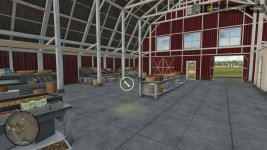
Transform your farm into a true Multiplayer Agricultural Cooperative, where all producers can trade with each other through a centralized purchasing, selling and storage system. Ideal for multiplayer servers that seek more realism, dynamic economy and teamwork.
How the Cooperative works
The first farm to place the cooperative becomes responsible for its administration. From that moment on, all other players will be able to use the cooperative to sell their products.
Product Negotiation
Producers can sell their products to the cooperative for a configurable percentage of the market price.
Producers can also purchase products available in the cooperative’s stock for a configurable value.
The cooperative works as an agricultural distribution center, allowing you to store products, redistribute them among members and create your own economy within the server.
Compatible with virtually all types of game products, including grains, milk, wood, fruits, seeds, fertilizers and products added by compatible maps or mods.
Cooperative Resources
Administration Panel
Access the panel via Shift + M to configure:
Percentage of cooperative purchase
Percentage of cooperative sales
Storage capacity
General system settings
Stock Control
Follow in real time:
Stored products
Available quantity of each item
Input and output movement
Complete management of cooperative resources
Collection and Withdrawal System
With a trailer or tank positioned in the loading area, products are transferred directly.
Products that use pallets can be physically picked up next to the cooperative.
Purchase, sale and withdrawal take place in the same place, facilitating logistics for members.
Full Multiplayer
Fully synchronized for multiplayer.
All players see the co-op markers, menus and information.
Stock, configurations and movements are updated in real time.
Data automatically saved in the savegame.
Compatible with dedicated servers.
Default Settings
Sale to cooperative: 90% of the market price
Purchase at the cooperative: 120% of the market price
Initial capacity: 100,000 liters per product
All values can be changed by the cooperative administrator
How to Use
Open Construction mode.
Search for Agricultural Cooperative.
Position the cooperative on the map.
The first farm to build the cooperative becomes administrator.
Approach it and press E to open the menu.
To sell, park the loaded vehicle in the trading area.
To purchase, select a product available in stock.
To manage the cooperative, use Shift + M.
Manage stored products through the Stock tab.
Create a cooperative agricultural economy
Organize server production, share resources between farms, centralize stocks and strengthen the community economy through a fully functional agricultural cooperative integrated with multiplayer.
 
Authors / Credits
paulinhoocs, tisonK
Download modification
https://zippymods.com/kba1j8m8lmpv/FS25_CooperativaAgricola.zip.html
The concept of a Multiplayer Agricultural Cooperative in FS25 is truly innovative and offers a rich gameplay experience for players seeking realism, teamwork, and dynamic economy in multiplayer farming scenarios. Let's break down some key features and benefits of this cooperative system:

1. **Centralized Trading System**: The cooperative serves as a hub for all producers to trade products with each other efficiently. This centralized platform streamlines transactions, enhances cooperation, and fosters a sense of community among players.

2. **Product Negotiation**: Producers have the flexibility to sell their products to the cooperative at a configurable percentage of the market price, enabling fair deals and economic balance. Additionally, they can purchase items from the cooperative's stock at a configurable value, promoting collaboration and resource sharing.

3. **Storage and Distribution Center**: The cooperative acts as an agricultural distribution center, offering storage facilities for various products. This feature allows for the efficient management and redistribution of goods among members, creating a self-sustaining economy within the multiplayer server.

4. **Versatile Product Compatibility**: The cooperative supports a wide range of in-game products, including grains, milk, wood, fruits, seeds, fertilizers, and custom items from compatible maps or mods. This versatility ensures that all players can participate and benefit from the cooperative regardless of their specific production focus.

5. **Administration Panel**: The cooperative administrator gains control over key settings such as purchase/sale percentages, storage capacity, and system configurations via the Shift + M interface. This level of customization enables tailored gameplay experiences and efficient management of cooperative resources.

6. **Real-Time Stock Control**: Producers can monitor stored products, available quantities, and input-output movements in real time. This transparency enhances decision-making, resource planning, and overall operational efficiency within the cooperative.

7. **Collection and Withdrawal System**: The cooperative offers a seamless process for transferring products, whether through trailers, tanks, or manual handling of pallets. This streamlined collection and withdrawal system simplifies logistics for members and promotes smoother trading interactions.

8. **Full Multiplayer Integration**: The cooperative is fully synchronized for multiplayer gameplay, ensuring that all players have access to cooperative markers, menus, and updated information. Real-time updates, automatic data saving, and compatibility with dedicated servers enhance the multiplayer experience and cooperative functionality.

9. **Customizable Settings**: Default settings provide a baseline for cooperative operations, including sale/purchase percentages and initial storage capacity. However, the administrator has the flexibility to adjust these values to meet the specific needs and preferences of the cooperative members, further enhancing gameplay customization.

10. **User-Friendly Interface**: With clear instructions on setting up and using the cooperative, players can easily integrate the cooperative into their farming operations and start leveraging its benefits for enhanced gameplay experiences.

Overall, the Multiplayer Agricultural Cooperative in FS25 offers a comprehensive and immersive cooperative farming experience that promotes collaboration, strategic planning, and economic development among players in a multiplayer environment. It enriches the gameplay dynamics, encourages teamwork, and enhances the overall enjoyment of farming simulations within a cooperative framework.
 
FS25 Sidebar Menu (PNG Icons)

FS25Mods.com - Download Farming Simulator 25 Mods for FREE

Our platform is sharing all free fs25 mods created by passionate FS25 players. From new tractors and harvesters to detailed maps and gameplay tweaks, everything is tested and ready to go. Finding and installing mods is super easy. Just browse by category, pick what you like, and download fast for free. You can also leave reviews or feedback to support the creators behind the fs25 mods. Whether you’re new to the game or you’ve been modding for years, FS25Mods.com is a great place to discover latest game mods for FS25 game.

Back
Top