
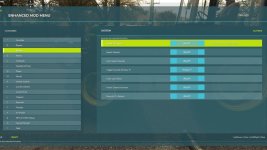
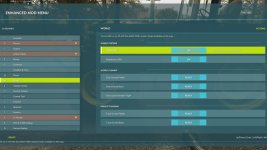
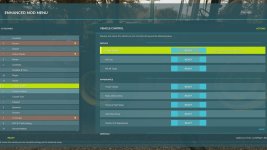

This FS25 modification adds a mod and cheat menu with a huge range of functionality. Dozens of features are available.
General Menu Features:
– Full in-game Enhanced Mod Menu for Farming Simulator 25, opened with Left Alt + M;
– Favorites system for quick access to frequently used functions;
– Recent actions section;
– Function search with search results;
– Active cheats overview;
– Undo option for the last action;
– Reset button to restore supported changes to default values;
Money And Economy:
– Preset money options: add or remove $10,000, $100,000, or $1,000,000;
– Custom money editing: add, remove, or set the balance to a custom amount;
– Ideal Market option;
– Dynamic Difficulty Breaker option;
– Refund All Costs;
– Free Purchases;
– Free Buildings;
– Daily costs toggle;
– Instant Production Payback;
– Currency selector with multiple currencies;
– Custom currency creation with editable code, name, symbol, and exchange rate;
Contracts:
– Infinite Contracts;
– Custom contract reward multiplier;
– Instant completion for all contracts;
– Contract board refresh;
Time, Weather And Seasons:
– Weather control: clear sky, rain, snow, and tornado;
– Editable temperature;
– Calendar date selection;
– Custom clock and time editing;
– Quick time presets: dawn, morning, noon, evening, and night;
– Time skip options: 1 day, 2 days, 7 days, 1 month, 3 months, 6 months, or 1 year;
– Editable time scale;
– Freeze Time option;
– Season switching: spring, summer, autumn, and winter;
– Field requirements override;
– Weather impact override;
– Always Ideal Conditions mode;
Player Tools:
– No Clip mode;
– Flight Mode;
– Super Strength;
– Player Invisible mode;
– Default HUD toggle;
– Editable player run speed;
– Editable player jump height;
World Cleanup And Markers:
– Traffic toggle;
– Pedestrian toggle;
– Owned pallet cleanup;
– Owned bale cleanup;
– Loose owned freight cleanup;
– Tracking markers for owned pallets and bales;
– Freight marker cleanup;
Vehicle Tools:
– Vehicle repair;
– Fuel refill;
– Full tank refill for all vehicle tanks;
– Vehicle washing;
– Vehicle dirt option;
– Paint wear removal;
– Paint wear adding;
– Full vehicle appearance restoration;
– Vehicle cloning;
– Current vehicle selling;
– Current vehicle deletion;
– Prevent Vehicle Flips mode;
– Vehicle teleportation to the map marker;
– Repair for all attached implements;
– Full tank refill for the attached vehicle/tool chain;
– Lift all attached implements;
– Lower all attached implements;
Vehicle Editing:
– Current vehicle max speed editing;
– Current vehicle reverse speed editing;
– Current vehicle power editing;
– Power reset option;
– Current vehicle mass editing;
– Crop damage toggle for the current vehicle;
– Ghost Mode for the current vehicle;
– Vehicle name editing;
– Vehicle configuration browser;
– Vehicle configuration option switching;
– Selected vehicle configuration application;
– Vehicle configuration information display;
Tool Editing:
– Current tool target selection;
– Tool work width editing;
– Tool work speed editing;
– Required power editing for tools;
– Current tool cloning;
Teleportation:
– Teleport destination filters;
– Destination selection;
– Teleportation to selected destinations;
Spawner:
– Spawner menu with category selection;
– Selected item spawning;
– Pile material selection;
– Custom pile amount editing;
– Pile spawning;
Forestry:
– Tree selection;
– Tree growth stage selection;
– Plant one tree ahead of the player;
– Plant five trees ahead of the player;
– Chainsaw Crosshair;
– Chainsaw speed switching;
– Remove living trees within 15 meters;
– Remove cut stumps within 25 meters;
– Remove the nearest cut stump;
– Clear cut logs within 25 meters;
AI Helpers:
– Free Helpers;
– Finish all AI workers;
– Teleportation to an active helper;
Traffic Control:
– Traffic cleanup around the player within 50 meters;
– Freeze Traffic;
– Traffic respawn;
Market And Crop Prices:
– Insider Trading for the harvest market;
– Peak Forecast information;
– Auto Trader;
– Custom harvest sales multiplier;
– Sales multiplier reset;
– Emergency restoration of all crop prices;
– Crop selection;
– Custom crop price editing;
– Set selected crop to the maximum price;
– Restore selected crop to the normal market price;
Field And Crop Tools:
– Perfect Field;
– Custom growth editing;
– Instant Grow;
– Instant Harvest;
– Crop selection for field planting;
– Plant selected crop;
– Auto Remove Weeds;
– Disable Stones;
– Soil state cycling;
– Instant plowing;
– Instant cultivating;
– Instant sowing;
– Instant fertilizing;
– Instant rolling;
Field Ownership And Field State:
– Selected field switching;
– Field selection by number;
– Field under player selection;
– Free purchase of the selected field;
– Selected field selling;
– Make all fields owned by the player;
– Reset ownership on all fields;
– Field state controls: lime, mulched, plowed, and rolled;
– Field fertilizer controls: 0%, 50%, and 100%;
– Weed removal for the selected field;
– Stone removal for the selected field;
Custom Map Markers:
– Custom map markers;
– Marker name editing;
– Marker description editing;
– Place marker at the player position;
– Marker selection;
– Teleportation to selected markers;
– Marker deletion;
– Delete all custom markers.
Conflicts:
– Grow now (thanks CollapsingVoid for test)
– Other scripts that interact with the same code/functions as the Mod Menu.
Mod is still in early BETA.
(the video shows an older version of the mod, so the interface there is outdated and many features are not available)
V1.5.0.0
A large update with lots of new options and fixes:
– Added the ability to spawn piles of bulk materials in front of the player;
– Since the Mod Menu now has too many features, a Favorites function has been added. You can add different actions from the mod menu to Favorites and access them directly from the very top menu, in the Favorites category. Press F to add an action to Favorites. The hotkey can be changed in the System category;
– The menu can now be controlled not only with hotkeys, but also with the mouse;
– Added a search system. You can find any function through search. To do this, select Search in the new System category, enter your query, and the Search Results category with all found results will appear in the menu;
– Added the ability to dirty, wash, wear out, remove wear, and restore vehicles;
– Added the ability to duplicate the current vehicle and separately duplicate tools attached to this vehicle;
– Added the ability to delete/sell the current vehicle directly from the menu;
– New menu category – Active Cheats. It displays all active cheats with a permanent effect, such as Invisible Player, NoClip, and so on. You can see the full list of activated cheats and deactivate them one by one, or reset everything using the new reset button. The category appears if you have any permanent active cheats. In addition, if a category contains an activated cheat, it will now be highlighted in red;
– Added the Recent Actions category, which displays information about the most recently applied cheats, acting as a quick access menu;
– Undo Last Action option. Reverts the last action if that action can be undone;
– Many categories have been merged to make the menu clearer and easier to use;
– Added several interactions related to AI helpers: teleport to a helper, disable all helpers, and free helpers;
– You can now select a specific field and edit it, such as changing its state, removing stones, and more. In addition, you can instantly make all fields yours, sell all fields so they no longer belong to the player, buy a specific field for free by number, sell a field, set the field fertilization level, and more. Added by request, thanks for the great idea;
– Added the ability to remove trees and stumps within a certain radius;
– The menu position is now saved. For example, if you close the menu while in the Forestry category, it will still open in the same category the next time;
– Menu changes are now saved. For example, if you enable Flight Mode, save the game and exit, then load the save again, you will still be in Flight Mode;
– Fixed a bug where the reverse max speed settings did not work;
– Fixed a bug with skipping days. It now skips days specifically, not months, and everything should function correctly;
– Fixed a bug with the Prevent Vehicle Flip option. It should now work correctly on most vehicles;
– Significantly improved translation quality for all languages. The original mod is in English;
– Updated the ModDesc version, made all required changes according to the official ModHub standards, and passed the TestRunner check.
- Authors / Credits
- Modslab
- Download modification
- https://zippymods.com/r39ip6lkahrm/FS25_EnhancedCheatMenu.zip.html

 Farming Simulator 25 Mods
 FS25 Maps
 FS25 Tractors
 FS25 Harvesters
 FS25 Trucks
 FS25 Trailers
 FS25 Vehicles
 FS25 Cars
 FS25 Buildings
 FS25 Implements
 FS25 Forklifts & Excavators
 FS25 Forestry
 FS25 Decorations
 FS25 Placeable objects
 FS25 Prefab
 FS25 Packs
 FS25 Weights
 FS25 Misc
 FS25 Textures
 FS25 Savegames
 FS25 Scripts
 FS25 Autodrive